Documentation Index

Fetch the complete documentation index at: https://docs.phala.com/llms.txt

Use this file to discover all available pages before exploring further.

Code Walkthrough and KT Materials

This page is an internal knowledge-transfer resource. It maps the codebase structure, traces the key request path from application to KMS, and highlights the files you’ll need to understand when contributing to dstack-cloud.
Note: This document is an internal deliverable for new contributors and team members.

Guide for New Contributors

If you’re new to dstack-cloud, here’s the recommended reading order:
  1. Understand the architecture — Read overview first to get the big picture
  2. Set up the development environment — Follow the README in the repository root
  3. Start with a simple workload — Deploy a basic nginx container on GCP using the Quick Start
  4. Explore the KMS — Deploy KMS and observe the bootstrap flow
  5. Read the attestation code — Understand how measurements are generated and verified
  6. Review the contracts — Understand the governance model and on-chain authorization

Repository Structure

The codebase is organized into these key areas:
dstack-cloud/
├── cli/                    # dstack-cloud CLI tool
├── kms/                    # dstack-kms service
├── packages/
│   ├── attestation/        # Attestation modules (TDX, NSM, TPM)
│   ├── guest-agent/        # Guest Agent (runs inside CVM)
│   ├── gateway/            # TLS termination and RA-TLS gateway
│   └── vmm/                # Virtual Machine Monitor
├── contracts/              # Smart contracts (DstackKms, DstackApp)
├── scripts/                # Build and deployment scripts
└── docs/                   # Documentation

Core Request Paths

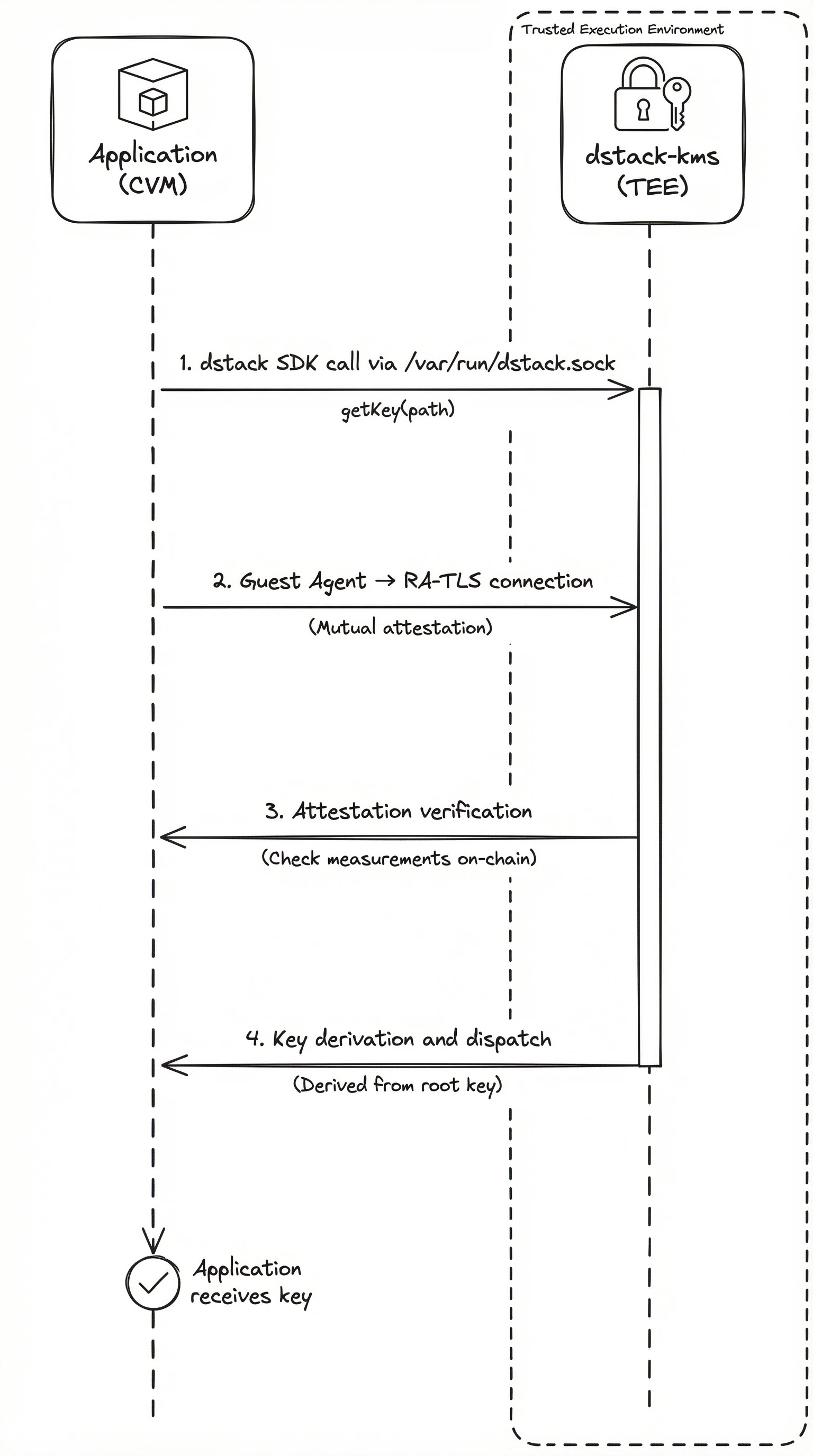
Understanding how a key request flows through the system is the best way to learn the codebase. Here’s what happens when an application asks KMS for a key:

Key Request Flow

GCP (via Guest Agent):
Application (in CVM)
  → dstack SDK (via /var/run/dstack.sock)
  → Guest Agent
  → RA-TLS connection
  → dstack-kms (in separate TEE)
  → Attestation verification
  → On-chain measurement check
  → Key derivation and dispatch
  → RA-TLS response
  → Guest Agent
  → Application receives key
AWS Nitro (via dstack-util):
dstack-util (in Enclave)
  → NSM attestation document obtained
  → VSOCK → VSOCK Proxy → dstack-kms (in separate TEE)
  → Attestation verification (NSM + OS_IMAGE_HASH)
  → On-chain measurement check
  → Key derivation and dispatch
  → Key returned to dstack-util
  → Application receives key (user decides usage)
Key Request Flow

CVM Deployment Flow

When you run dstack-cloud deploy, the CLI parses your configuration and orchestrates the creation of a TEE environment. The flow differs by platform: GCP (dstack CVM):
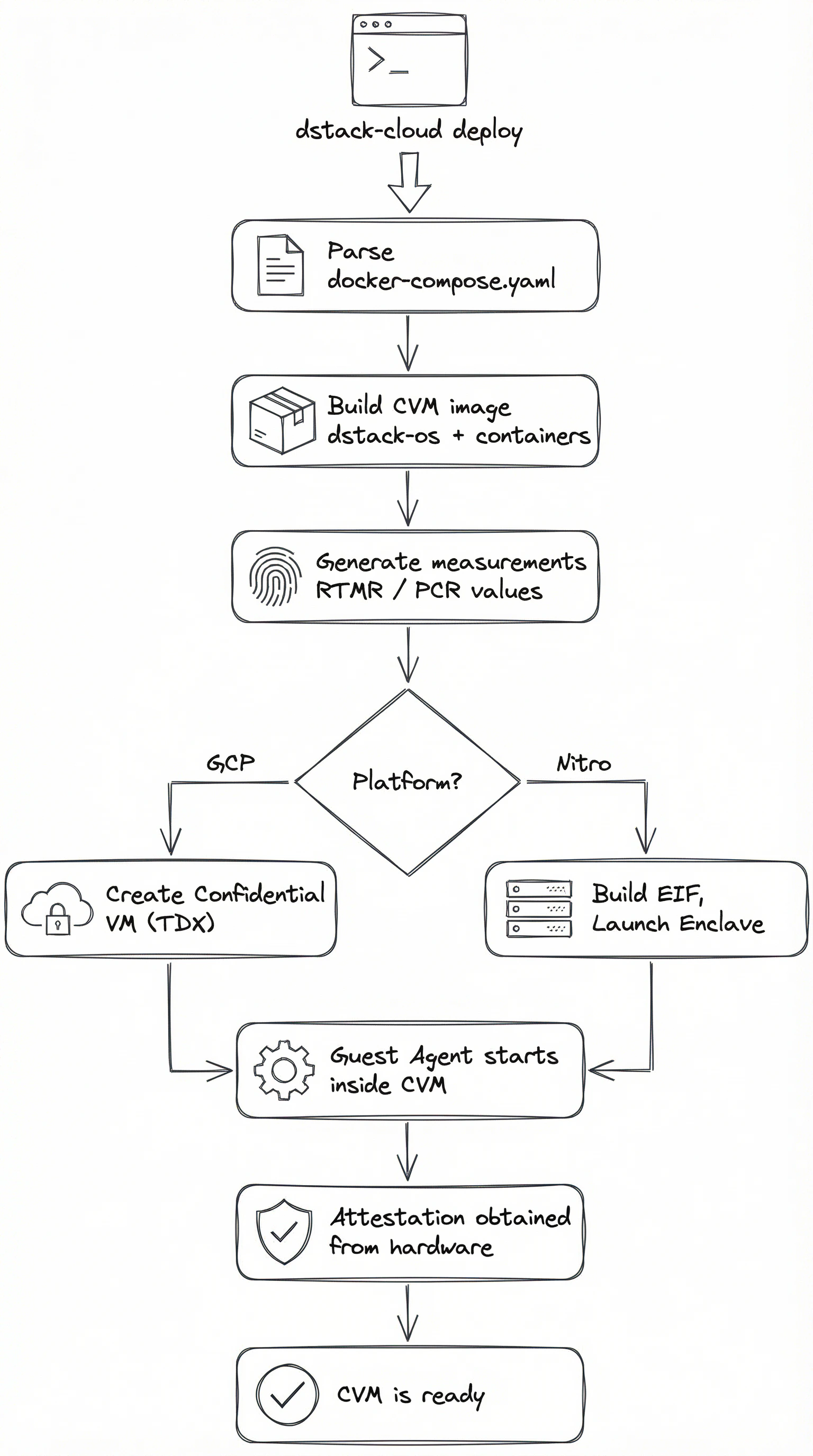
dstack-cloud deploy
  → Parse docker-compose.yaml
  → Build CVM image (dstack-os + containers)
  → Generate measurements (RTMR values)
  → Create Confidential VM with TDX
  → Guest Agent starts inside CVM
  → Attestation obtained from hardware
AWS Nitro (Enclave):
dstack-cloud deploy
  → Build Docker image from Dockerfile
  → Run nitro-cli build-enclave → generates EIF
  → 3 PCRs (PCR0-2) produced at build time
  → Combine 3 PCRs into 1 OS_IMAGE_HASH
  → Register OS_IMAGE_HASH on-chain (via governance)
  → Launch Enclave on EC2 instance
  → dstack-util handles attestation and key retrieval
CVM Deployment Flow

Attestation Module

The attestation module abstracts platform-specific hardware attestation behind a common interface. Each platform has its own module:
PlatformModuleInputOutput
GCP (TDX)tdx-attestTDX hardwareTDX Quote
AWS Nitronsm-attestNSM deviceAttestation Document
GCP (TPM)tpm-attestTPM deviceTPM Quote

Key Files

These are the files you’ll spend the most time in when contributing:
FilePurpose
kms/src/main.rsKMS service entry point, RPC handlers, bootstrap logic
packages/guest-agent/src/main.rsGuest Agent entry point, local API server
packages/attestation/src/lib.rsPlatform-agnostic attestation interface
cli/src/main.rsCLI entry point, deploy/status/logs commands
contracts/contracts/DstackKms.solKMS policy contract
contracts/contracts/DstackApp.solApplication contract

Resources