

On-chain Governance Model
On-chain governance ensures that key policy changes — like adding or revoking workload measurements — cannot happen silently. Every authorization change goes through a Multisig + Timelock process and is recorded on-chain for anyone to audit.Core Smart Contracts
DstackKms
The KMS policy contract. It stores:- Authorized measurements — The list of workload measurements (RTMR / OS_IMAGE_HASH) that are allowed to receive keys
- Configuration parameters — KMS-related settings controlled by governance
- Admin roles — Addresses authorized to perform governance operations
DstackApp
The application-level entry contract. It:- Holds a reference to DstackKms
- Enforces application-specific checks before delegating to the KMS
- Acts as the on-chain identity for a specific deployment
GovernanceSafe
Optional. A multisig wallet (typically Safe) that you can introduce to enhance governance security:- Owns DstackKms and DstackApp
- Is the only entity allowed to execute governance operations (registering measurements, changing admin, upgrading contracts)
- Requires multiple signers to approve any transaction
Note: GovernanceSafe is not part of dstack or dstack-cloud. It is an optional governance mechanism you can add to prevent unilateral control over key policies.
Timelock
Optional. A delay module attached to the multisig that:- Enforces a mandatory waiting period between approval and execution
- Maintains a queue of pending governance actions
- Gives the community time to review and respond to proposed changes
Note: Like GovernanceSafe, Timelock is an optional enhancement. You can use it with a multisig to add a delay before governance actions take effect.
Governance Workflow
Basic Workflow (without Multisig/Timelock)
At minimum, governance operations (registering measurements, updating configuration) are performed by the admin address directly:- Admin submits a transaction to DstackKms or DstackApp
- Transaction executes immediately
- Changes take effect right away
Enhanced Workflow (with Multisig + Timelock)
For production deployments, we recommend introducing a multisig wallet (e.g., Safe) and a timelock. The workflow becomes: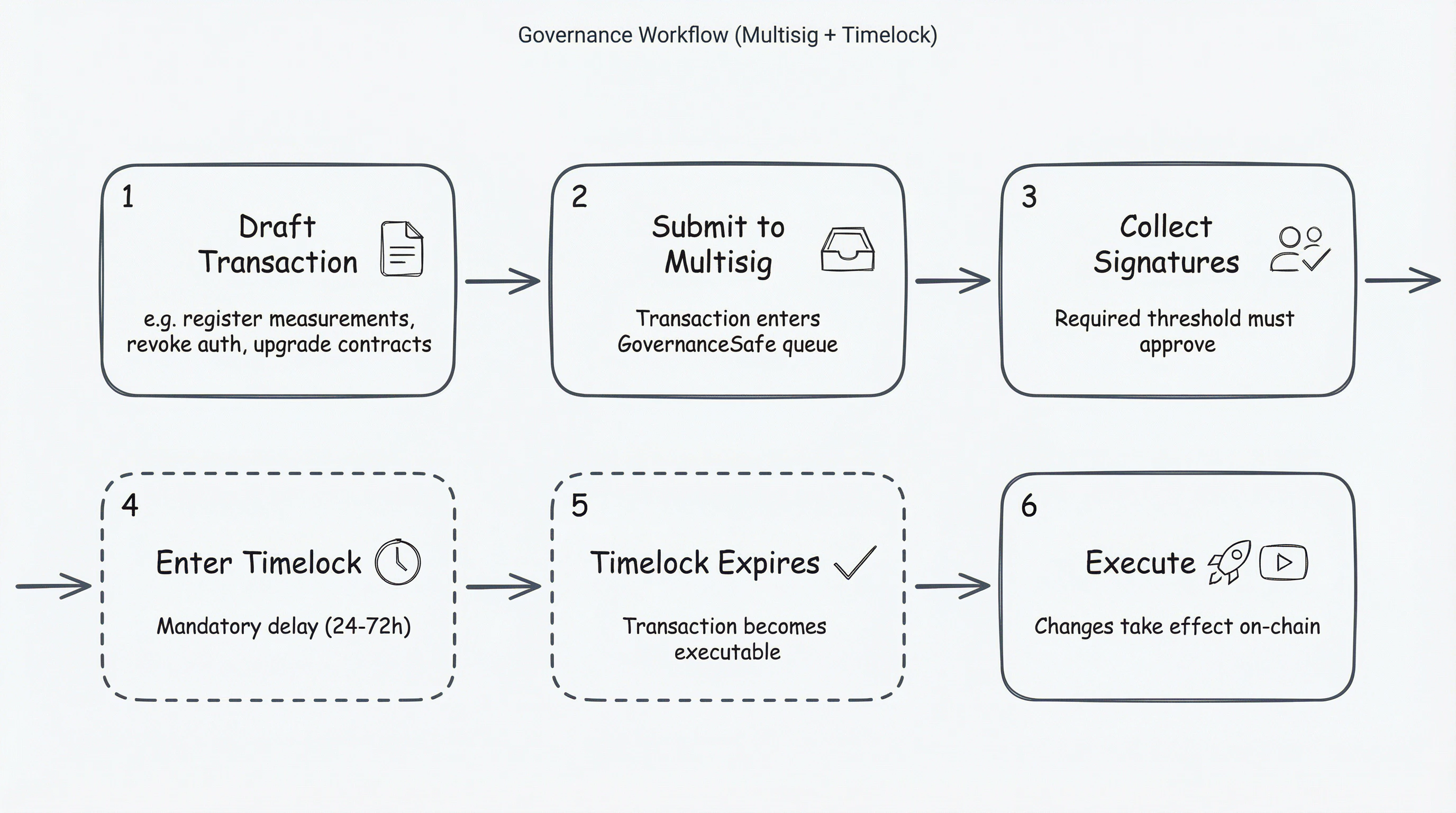
- Draft — A governance action is proposed (e.g., register new measurement)
- Submit to Multisig — The action is submitted to the multisig wallet
- Approve — Required number of signers approve the transaction
- Queue in Timelock — The approved action is queued and must wait for the delay period
- Wait — The delay period passes (e.g., 48 hours), allowing time for review
- Execute — After the delay, anyone can execute the action
- No single party can unilaterally modify key policies
- All changes are visible and reviewable before taking effect
- Stakeholders have time to respond to suspicious proposals
Role of Multisig + Timelock
Recommended Configuration
Typical Governance Scenarios
Register New Measurements (New Version Deploy)
When you update your application code or dstack OS version, the measurements change. You must register the new measurements before KMS will dispatch keys:- Build the updated CVM image
- Extract new measurements (RTMR3 / OS_IMAGE_HASH)
- Draft a governance transaction to add the new measurements to DstackKms
- Submit to multisig for approval
- Wait for timelock
- Execute — KMS now authorizes workloads with the new measurements
- Deploy the updated CVM
Revoke a Compromised Measurement (Emergency)
If a measurement is found to be vulnerable or unauthorized:- Draft a governance transaction to remove the measurement from DstackKms
- Submit to multisig for expedited approval
- Wait for timelock (cannot be bypassed — this is by design)
- Execute — KMS immediately stops dispatching keys to workloads with that measurement
Note: Even in emergencies, the timelock cannot be skipped. This is intentional — it ensures all changes are visible and reviewable. Plan your security incident response accordingly.
Upgrade Smart Contracts
If the contracts need to be upgraded (e.g., bug fix, new feature):- Deploy the new contract implementation
- Draft a governance transaction to update the proxy’s implementation address
- Submit to multisig for approval
- Wait for timelock
- Execute — the proxy now points to the new implementation
Security Considerations
- Use hardware wallets: All multisig signers should use hardware wallets (e.g., Ledger, Trezor) to protect their signing keys.
- Set appropriate thresholds: A threshold of ≥ 2/3 ensures that compromising a minority of signers is insufficient to push through malicious changes.
- Regular health checks: Periodically verify that all signers are still accessible and the governance configuration is as expected.
- Monitor governance activity: Set up alerts for governance transactions (proposals, approvals, executions) to detect suspicious activity early.
Next Steps
- Deploy On-chain KMS Smart Contracts — Set up contracts on testnet or mainnet
- Manage Governance — How to create proposals and execute governance actions
- Security Model — Trust boundaries and security guarantees