

dstack-cloud Overview
dstack-cloud lets you run Docker applications inside hardware-encrypted Trusted Execution Environments (TEEs) on GCP Confidential VMs and AWS Nitro Enclaves — without owning specialized bare-metal servers. Built on the open-source dstack framework, it brings TEE security to mainstream cloud platforms. Your code and data stay encrypted in memory, even from the cloud provider.What is dstack
dstack is an open-source confidential computing framework originally designed to run on TDX BareMetal servers. It provides:- Hardware-level memory encryption and isolation via TEE (Trusted Execution Environment)
- A key management system (KMS) that delivers secrets exclusively to verified workloads
- Remote attestation to prove that code is running in genuine TEE hardware
- SDK libraries in Python, TypeScript, Rust, and Go for application integration (the dstack-sdk)
What is dstack-cloud
dstack-cloud extends dstack to run on major cloud platforms. Instead of requiring bare-metal TDX hardware, it enables deployment on:- GCP Confidential VMs (Intel TDX)
- AWS Nitro Enclaves (NSM)
How It Works
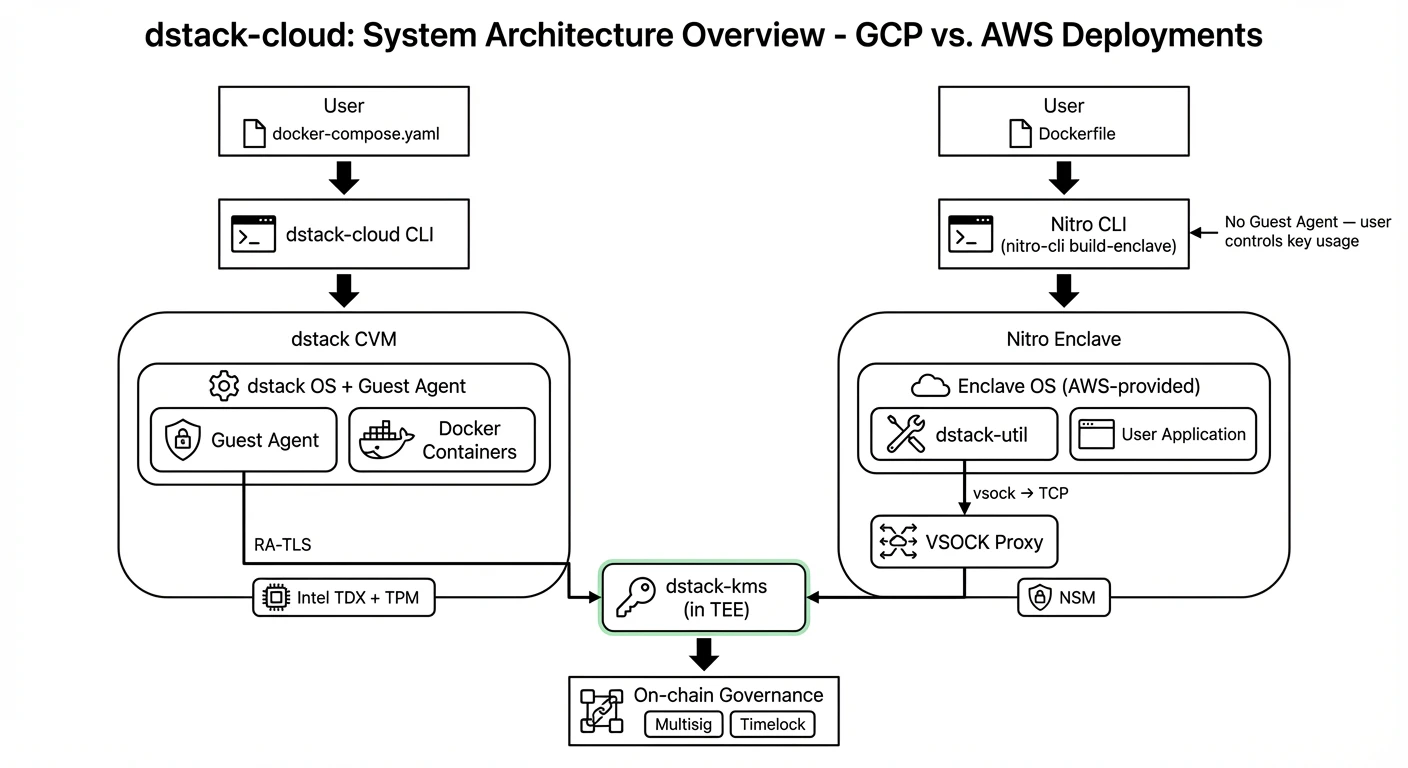
dstack-cloud deploy handles the rest: building a TEE environment, managing attestation, and delivering keys.
On GCP:
dstack-cloud deploycreates a Confidential Virtual Machine running dstack OS with Intel TDX enabled.- A Guest Agent inside the CVM handles attestation, key retrieval from KMS, and automatic disk encryption.
- Your application communicates with the Guest Agent via a Unix socket (
/var/run/dstack.sock).
On AWS Nitro:
- AWS Nitro CLI converts your Dockerfile into an Enclave Image File (EIF) using Enclave OS (AWS-provided).
- The EIF runs as a Nitro Enclave — there is no dstack OS and no Guest Agent.
dstack-utilinside the Enclave handles attestation and key retrieval from KMS. Your application decides how to use the key.
The two platforms have different architectures. See Nitro Enclave Integration for a detailed comparison.
Key Components
Typical Use Cases
AI Inference with Model Protection
Deploy AI models with model weights fully encrypted in memory. The cloud provider cannot access or copy your proprietary models.Sensitive Data Processing
Process healthcare, financial, or personal data in a hardware-isolated environment. Memory encryption ensures that even system administrators cannot read your data.DeFi and Web3 Applications
Run smart contract backend services or trading bots with private keys that never leave the TEE. The on-chain governance model provides verifiable, auditable key management.Supported Environments
What You Need
- An AWS or GCP account with appropriate permissions
dstack-cloudCLI installed- A
docker-compose.yamldefining your application - (Optional) dstack-sdk integration for key retrieval from within your containers
Next Steps
- Quick Start Tutorial — Deploy your first dstack CVM in 30 minutes
- Nitro Enclave — How AWS Nitro Enclaves work in dstack-cloud
- KMS and Key Delivery — Understand how keys are managed and delivered
- Security Model — Trust boundaries and security guarantees
- Attestation Integration — How remote attestation works across platforms