> ## Documentation Index
> Fetch the complete documentation index at: https://docs.phala.com/llms.txt
> Use this file to discover all available pages before exploring further.
# Deploy ERC-8004 Agent in 5 Minutes
> Deploy a verifiable ERC-8004 Trustless Agent using Phala Cloud's VibeVM with TEE attestation
## TL;DR
* **ERC-8004** gives us onchain primitives to register and discover *trustless agents*.
* To make those registrations meaningful, you want verifiable runtime evidence, not just a signature.
* **Confidential VMs (CVMs)** running **dstack** to deliver **deterministic key derivation** + **remote attestation** so your agent can prove *where* it executed.
* **Phala Cloud** wraps this in a bow: VibeVM templates, an onchain KMS/registry workflow, and (optionally) confidential inference (GPU TEE) support.
* This post walks the whole flow: deploy a CVM → produce attestation → register identity on Sepolia → verify via **TEERegistry**.
***
## Why Trustless Agents Matter
Distributed systems increasingly outsource work to off-chain agents—indexers, oracles, model inference, payment relays. When an agent signs a statement or moves value, a bare signature only proves **key possession**, not execution context. The missing link is provenance: *did this response come from the runtime I expect?*
**ERC-8004** gives us a compact onchain model for agent identity and discovery. Pair it with TEE-backed CVMs and you get the runtime receipts you've been wishing for: **attested execution**. Explore more [confidential AI agent use cases](https://phala.com/solutions/ai-agents) and implementations.
***
## What's broken today (and how we fix it)
* Agents are usually deployed ad hoc; signed responses alone don't say anything about *where* the code ran.
* Keys can be copied; logs can be forged; environments can be jailbroken.
* What agents actually need:
1. **Deterministic key material** derived inside the runtime.
2. **Remote attestation** that binds keys + code measurements to a platform identity.
3. **Onchain discovery** so other contracts/clients can programmatically verify them.
ERC-8004 covers the onchain identity/registry. **TEEs + CVMs** supply runtime evidence. **Phala Cloud** ties it all together with templates, SDKs, and an onchain governance/KMS model.
***
## Deploy Your ERC-8004 Agent in TEE
### Pre-reqs
* [Phala Cloud](https://phala.com) account
* GitHub account (token only needed if cloning private repos)
* Wallet with **ETH Sepolia** funds for registration/funding
### 1) Deploy VibeVM: the TEE coding environment
* Go to [https://cloud.phala.com/templates/VibeVM](https://cloud.phala.com/templates/VibeVM) → **Deploy**
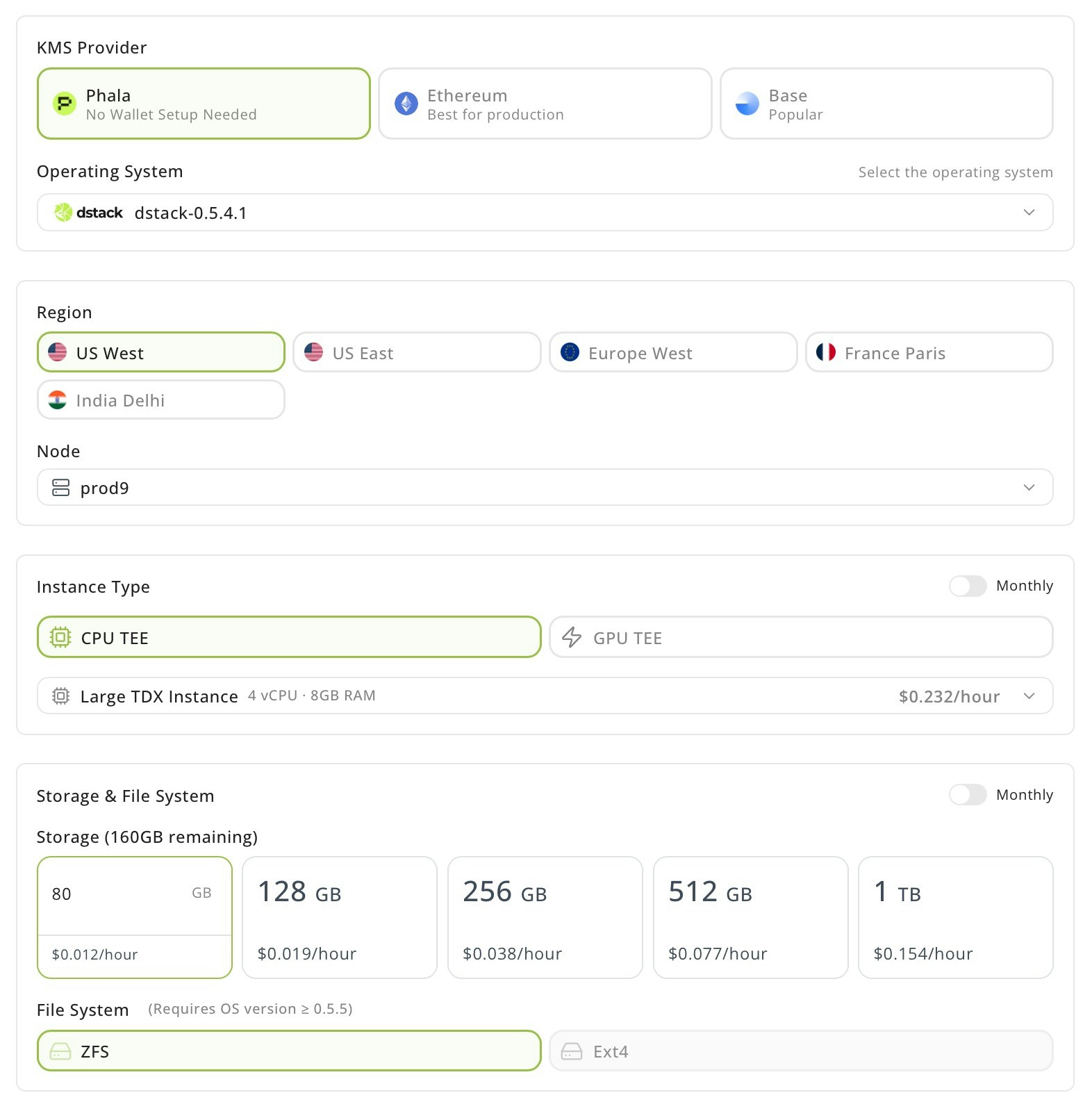
### 2) Configure the CVM
* **OS:** `dstack-dev-0.5.x` or newer
* **Instance:** Large TDX, **4 vCPU**, **8 GB RAM**, **>40 GB storage**
* **Set Encrypted Secrets (remember to change the password):**
```bash theme={"system"}
VIBEVM_AUTH_ENABLED=true
VIBEVM_USERNAME=vibe
VIBEVM_PASSWORD=vibevm4454
GITHUB_REPO=https://github.com/Phala-Network/erc-8004-tee-agent
# optional if the repo is private
GH_TOKEN=
```
**Tip:** GH\_TOKEN only needed for private repos.
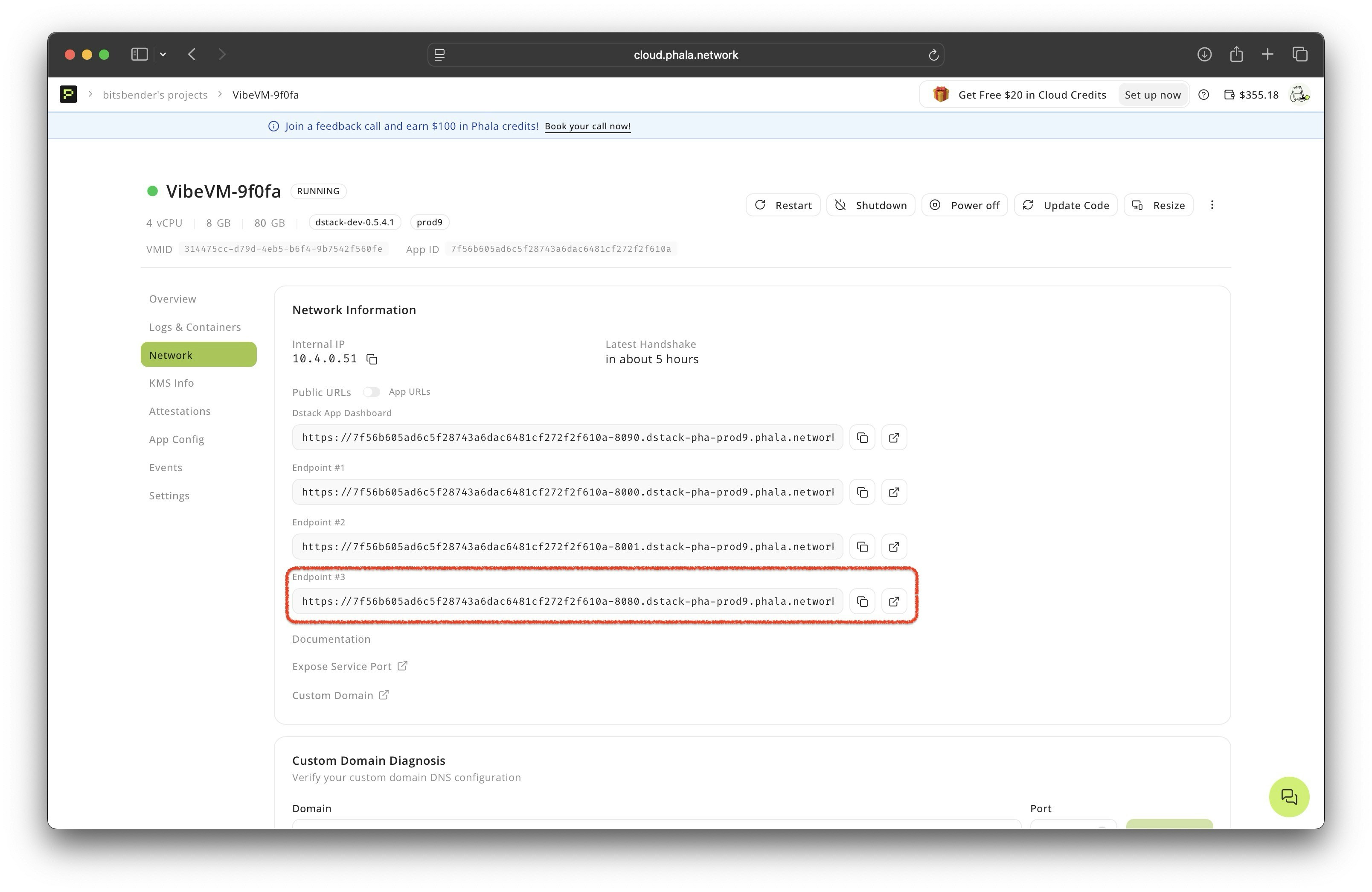
### 3) Deploy & open VibeVM
* Click **Deploy** and let provisioning finish.
* Open **View details → Networks** and click the URL with port **8080** to open the frontend.
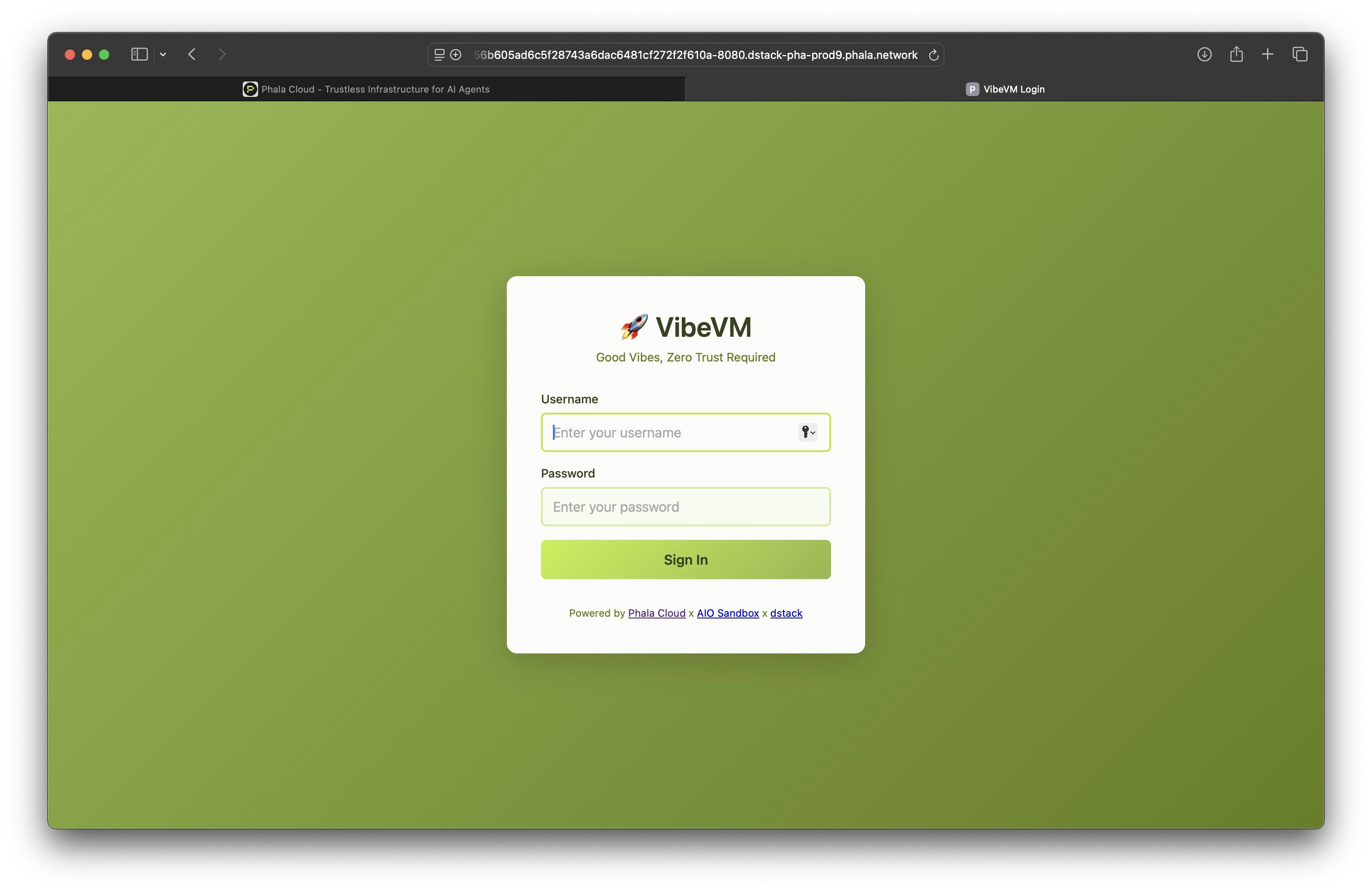
### 4) Sign into the VibeVM frontend
* Use the credentials you set.
* You'll land in a VSCode server with the repo already cloned.
### 5) Prep the agent
In the VSCode server terminal:
```bash theme={"system"}
cd erc-8004-tee-agent
cp .env.example .env
# Edit .env:
# AGENT_DOMAIN=
# REDPILL_API_KEY= # generate in Phala dashboard: /dashboard/confidential-ai-api
```
### 6) Build & run
```bash theme={"system"}
pip3 install -e .
python3 deployment/local_agent_server.py
```
Service should come up at:
```
https://-8000.
```
### 7) Register & fund the agent
* Visit your agent domain and step through the registration + wallet-connect funding flow.
* This calls **IdentityRegistry** on **Sepolia** to record the agent and posts the attestation to **TEERegistry**.
* Example demo transactions (Sepolia):
* IdentityRegistry: [0x88a03a29fe2c9a5881bbbdece91cd75c4e816a4dcda3f4ed2610bc119c517011](https://sepolia.etherscan.io/tx/0x88a03a29fe2c9a5881bbbdece91cd75c4e816a4dcda3f4ed2610bc119c517011)
* TEERegistry verify: [0x4b9810c3d1753b79c029938add20c237a4fd7b58eccd9b094bc54b3197c97a9e](https://sepolia.etherscan.io/tx/0x4b9810c3d1753b79c029938add20c237a4fd7b58eccd9b094bc54b3197c97a9e)
### 8) Verify attestation via TEERegistry
* Use the TEERegistry contract UI or explorer to confirm the attestation entry matches your IdentityRegistry entry.
* [View TEERegistry verification transaction](https://sepolia.etherscan.io/tx/0x4b9810c3d1753b79c029938add20c237a4fd7b58eccd9b094bc54b3197c97a9e)
### 9) Talk to the agent
* Hit the Agent API. You should get signed responses whose key matches what you registered, and whose runtime is backed by the TEE attestation onchain.
## Architecture
```mermaid theme={"system"}
flowchart LR
Client -->|API| AgentAPI[(ERC-8004 Agent API)]
AgentAPI -->|creates signature| Client
AgentAPI -->|registers| IdentityRegistry[IdentityRegistry Sepolia]
AgentAPI -->|attestation| TEERegistry[TEERegistry Sepolia]
subgraph Phala Cloud CVM
CVM[dstack CVM - VibeVM]
CVM -->|derive key from path| GetKey
CVM -->|produce attestation| GetQuote
end
AttestationService --> TEERegistry
IdentityRegistry --> TEERegistry
```
## Conclusion
ERC-8004 + TEE on **Phala Cloud** give you a practical path to trustless agents: deterministic keys, remote attestations, and onchain identity—wrapped in a dev flow that feels like spinning up a regular VM, just with superpowers.
## Resources
* [ERC‑8004 EIP](https://eips.ethereum.org/EIPS/eip-8004)
* [VibeVM Template](https://cloud.phala.com/templates/VibeVM)
* [Agent Template Repository](https://github.com/Phala-Network/erc-8004-tee-agent)
* [Phala Cloud](https://phala.com)
 ### 4) Sign into the VibeVM frontend
* Use the credentials you set.
* You'll land in a VSCode server with the repo already cloned.
### 4) Sign into the VibeVM frontend
* Use the credentials you set.
* You'll land in a VSCode server with the repo already cloned.
 ### 5) Prep the agent
In the VSCode server terminal:
```bash theme={"system"}
cd erc-8004-tee-agent
cp .env.example .env
# Edit .env:
# AGENT_DOMAIN=
### 5) Prep the agent
In the VSCode server terminal:
```bash theme={"system"}
cd erc-8004-tee-agent
cp .env.example .env
# Edit .env:
# AGENT_DOMAIN=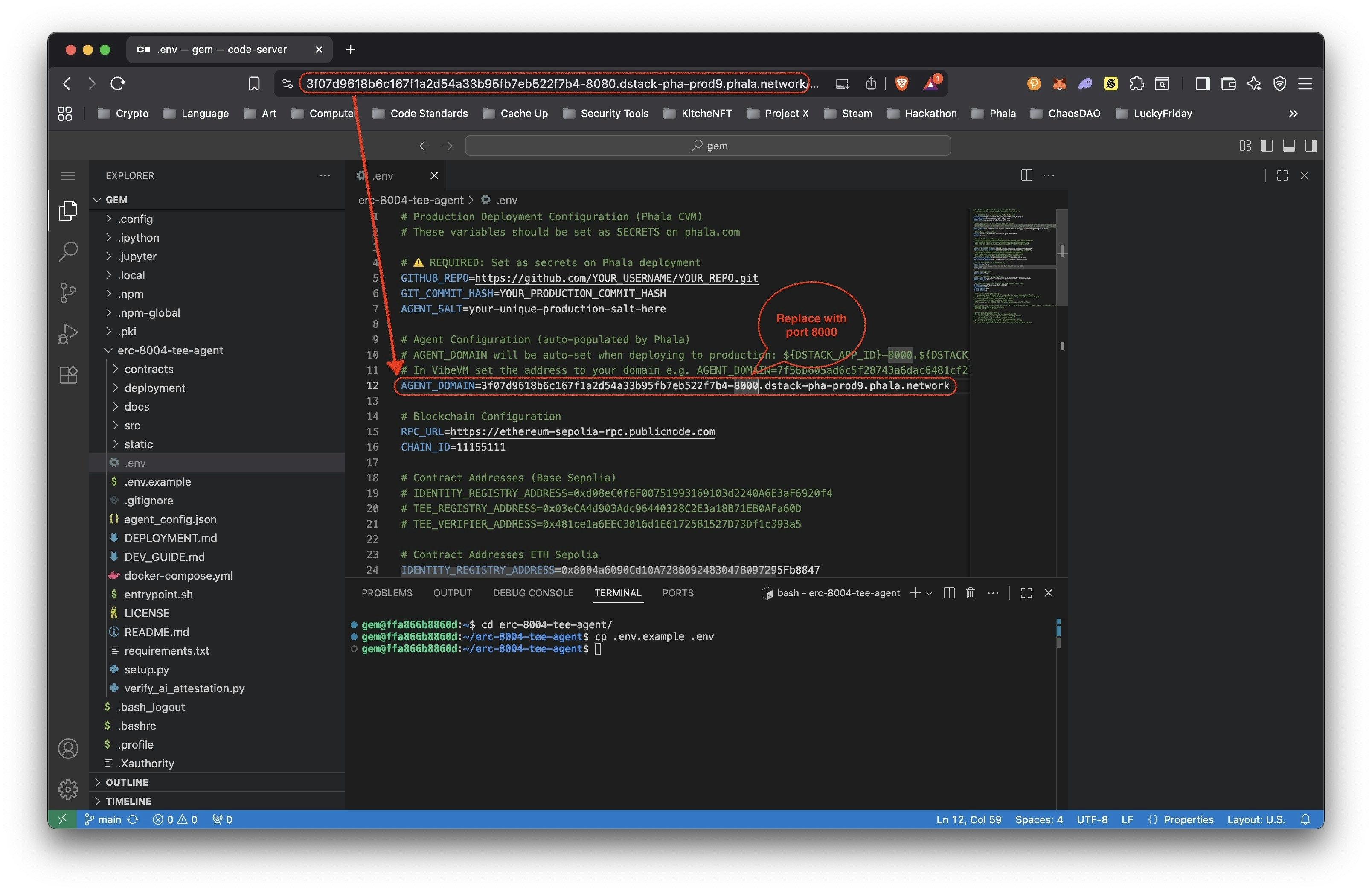 ### 6) Build & run
```bash theme={"system"}
pip3 install -e .
python3 deployment/local_agent_server.py
```
Service should come up at:
```
https://
### 6) Build & run
```bash theme={"system"}
pip3 install -e .
python3 deployment/local_agent_server.py
```
Service should come up at:
```
https://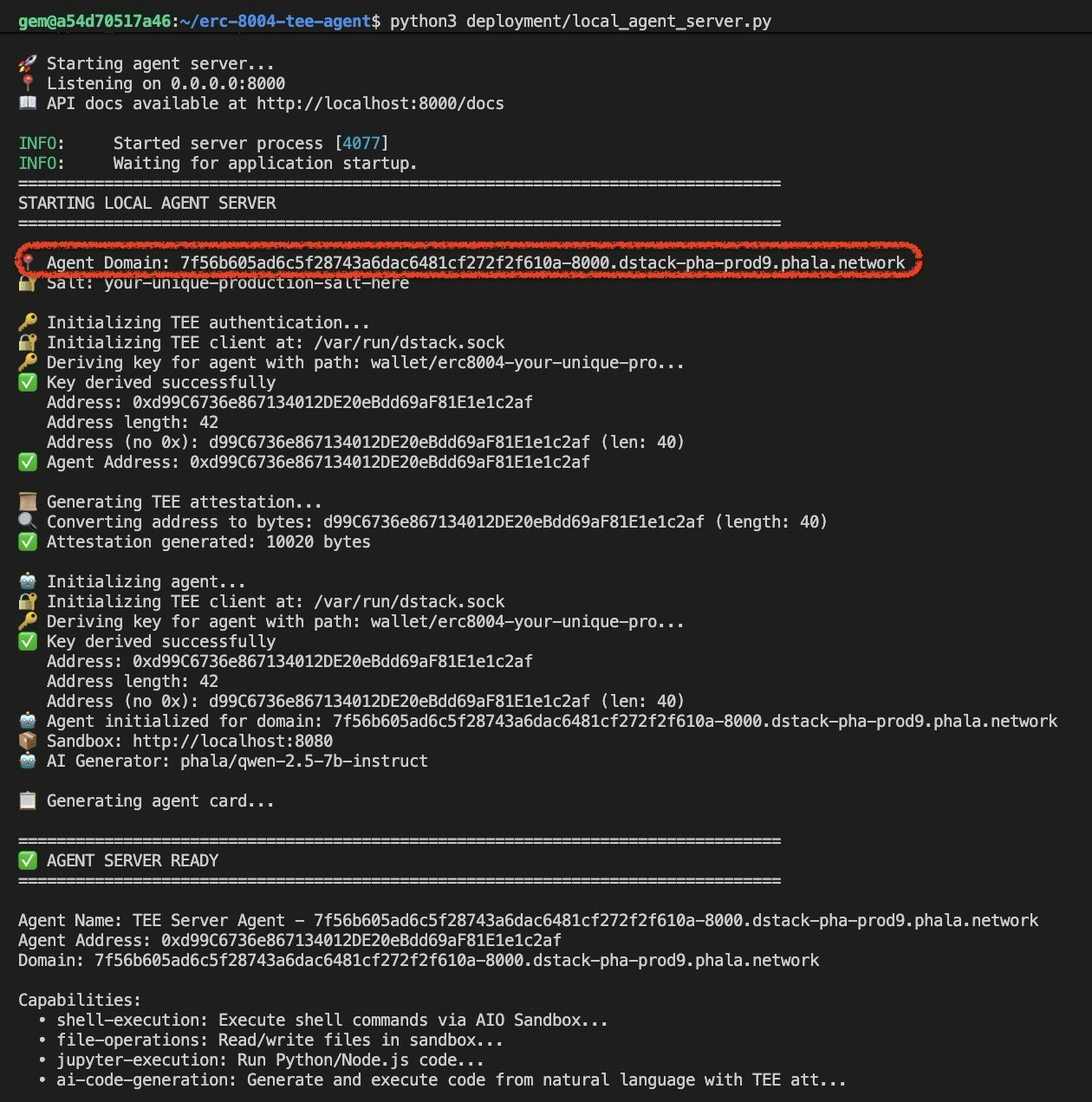 ### 7) Register & fund the agent
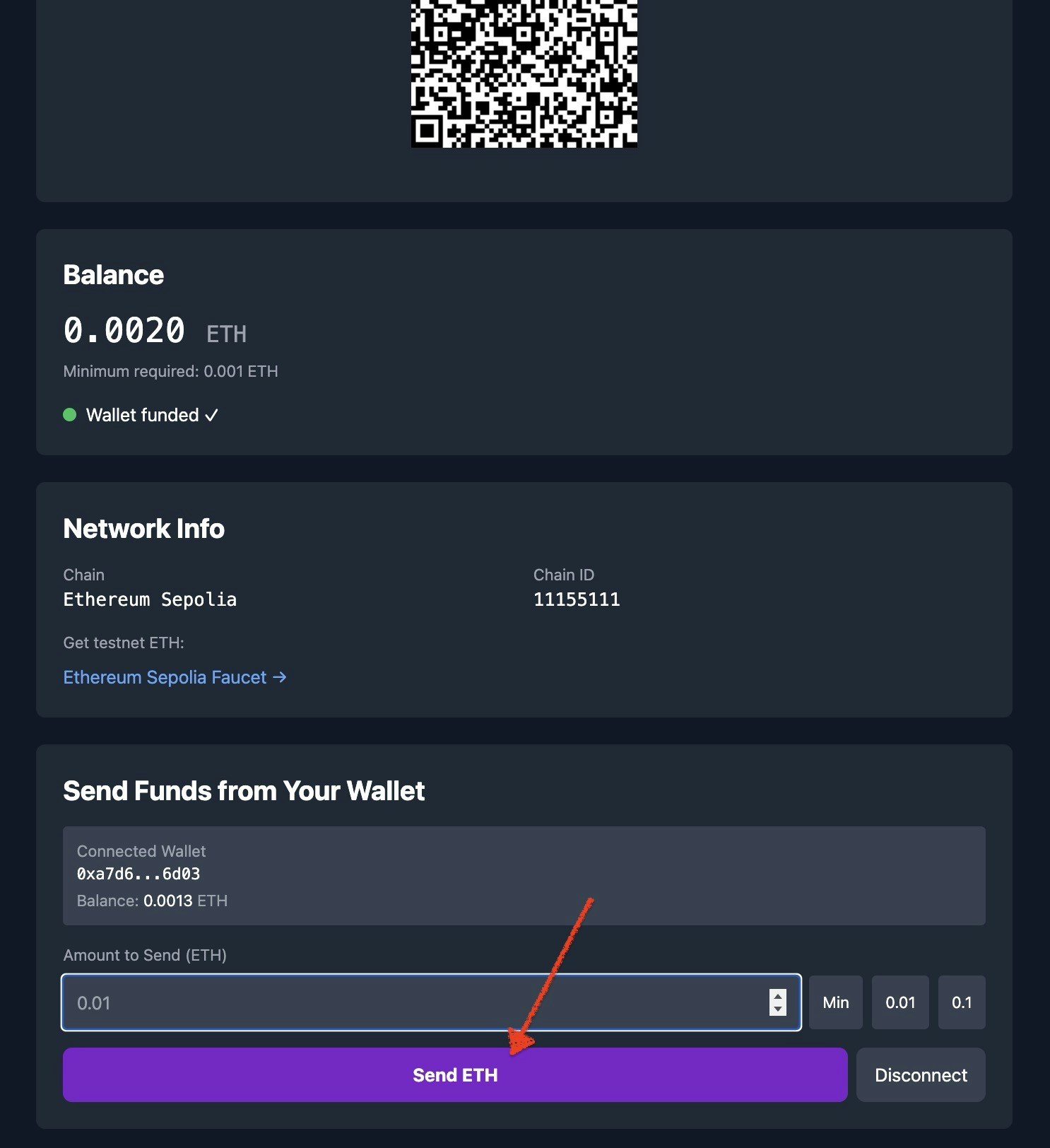
* Visit your agent domain and step through the registration + wallet-connect funding flow.
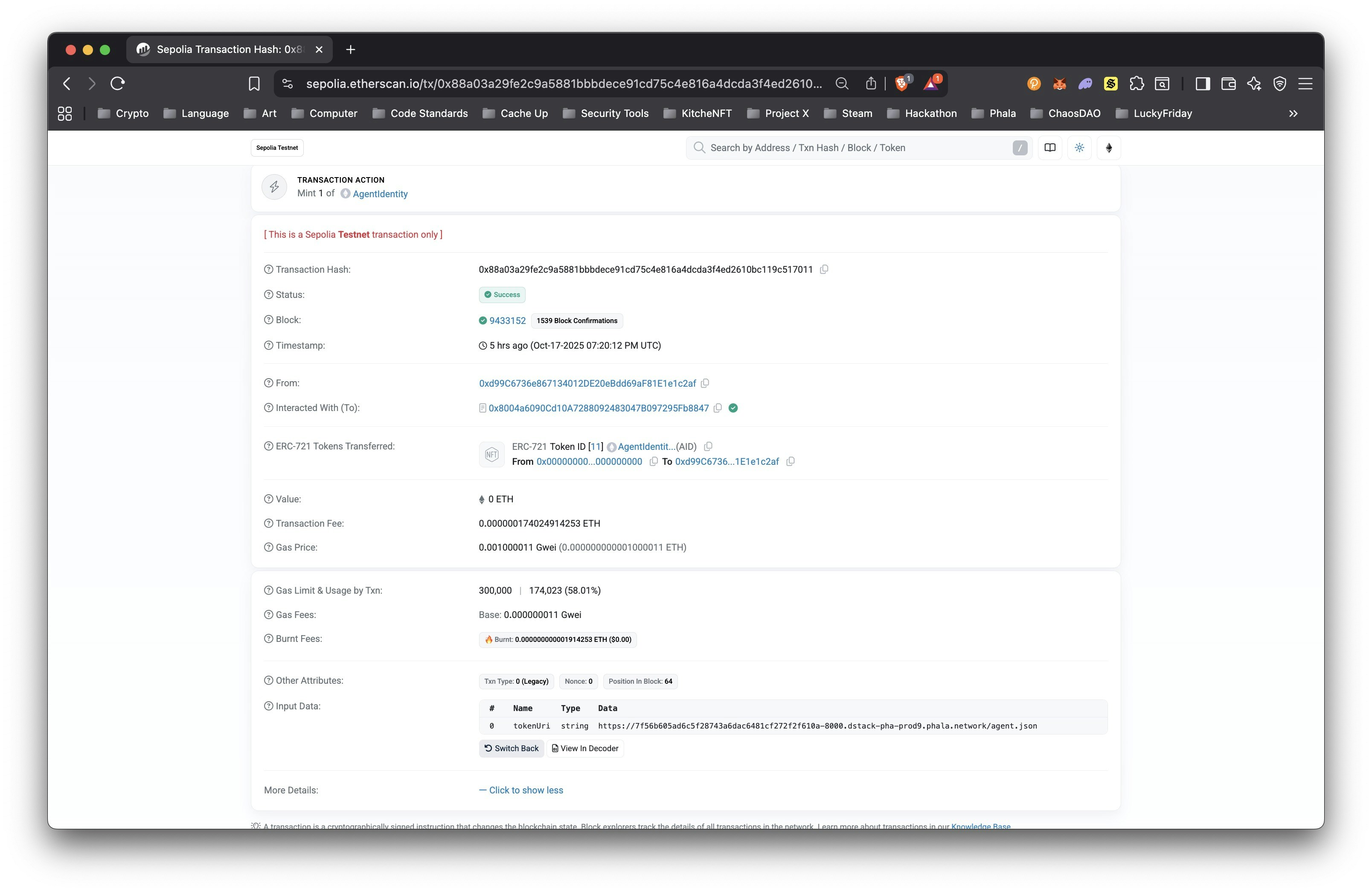
* This calls **IdentityRegistry** on **Sepolia** to record the agent and posts the attestation to **TEERegistry**.
* Example demo transactions (Sepolia):
* IdentityRegistry: [0x88a03a29fe2c9a5881bbbdece91cd75c4e816a4dcda3f4ed2610bc119c517011](https://sepolia.etherscan.io/tx/0x88a03a29fe2c9a5881bbbdece91cd75c4e816a4dcda3f4ed2610bc119c517011)
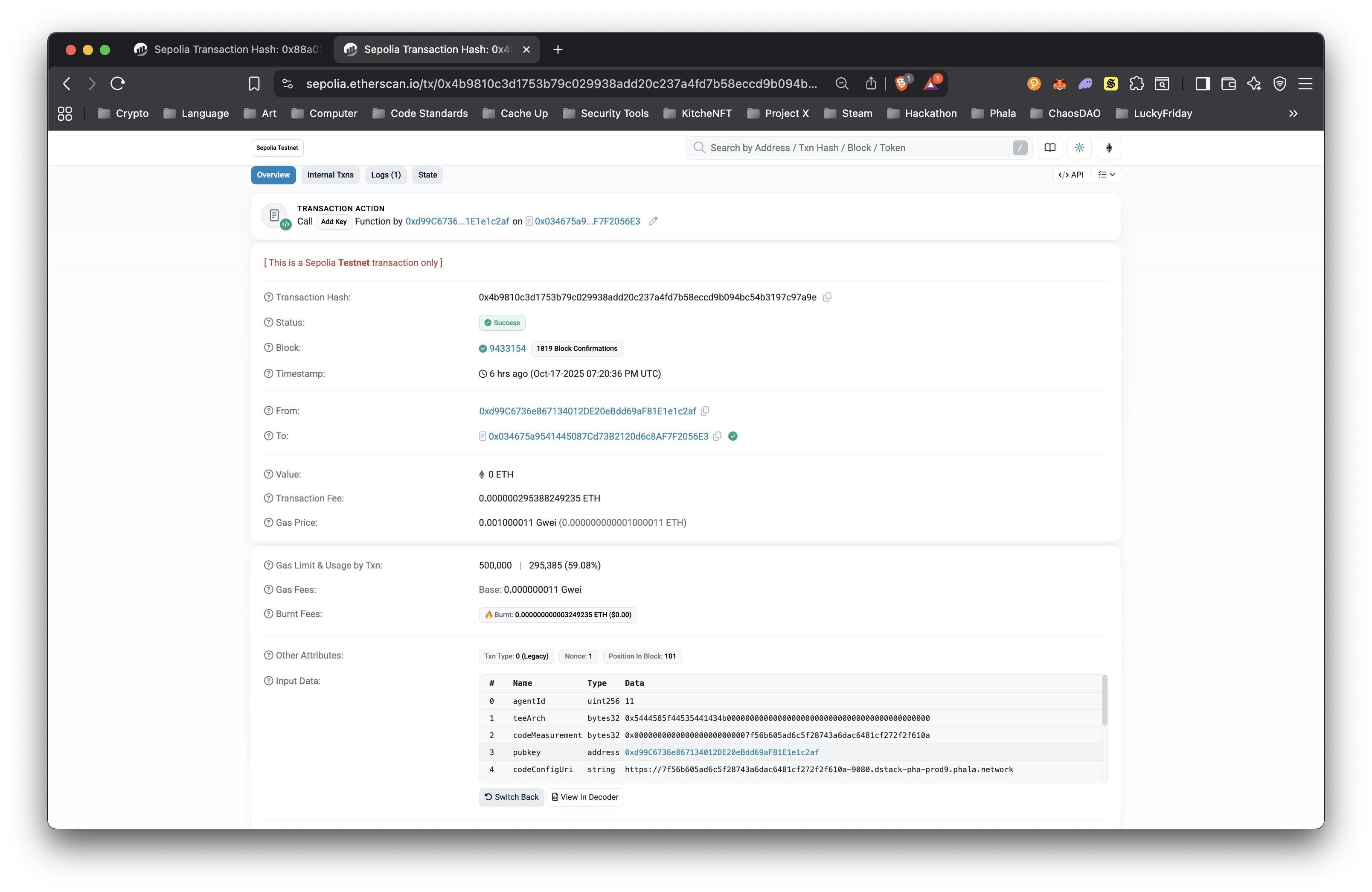
* TEERegistry verify: [0x4b9810c3d1753b79c029938add20c237a4fd7b58eccd9b094bc54b3197c97a9e](https://sepolia.etherscan.io/tx/0x4b9810c3d1753b79c029938add20c237a4fd7b58eccd9b094bc54b3197c97a9e)
### 7) Register & fund the agent
* Visit your agent domain and step through the registration + wallet-connect funding flow.
* This calls **IdentityRegistry** on **Sepolia** to record the agent and posts the attestation to **TEERegistry**.
* Example demo transactions (Sepolia):
* IdentityRegistry: [0x88a03a29fe2c9a5881bbbdece91cd75c4e816a4dcda3f4ed2610bc119c517011](https://sepolia.etherscan.io/tx/0x88a03a29fe2c9a5881bbbdece91cd75c4e816a4dcda3f4ed2610bc119c517011)
* TEERegistry verify: [0x4b9810c3d1753b79c029938add20c237a4fd7b58eccd9b094bc54b3197c97a9e](https://sepolia.etherscan.io/tx/0x4b9810c3d1753b79c029938add20c237a4fd7b58eccd9b094bc54b3197c97a9e)
 ### 8) Verify attestation via TEERegistry
* Use the TEERegistry contract UI or explorer to confirm the attestation entry matches your IdentityRegistry entry.
* [View TEERegistry verification transaction](https://sepolia.etherscan.io/tx/0x4b9810c3d1753b79c029938add20c237a4fd7b58eccd9b094bc54b3197c97a9e)
### 8) Verify attestation via TEERegistry
* Use the TEERegistry contract UI or explorer to confirm the attestation entry matches your IdentityRegistry entry.
* [View TEERegistry verification transaction](https://sepolia.etherscan.io/tx/0x4b9810c3d1753b79c029938add20c237a4fd7b58eccd9b094bc54b3197c97a9e)
 ### 9) Talk to the agent
* Hit the Agent API. You should get signed responses whose key matches what you registered, and whose runtime is backed by the TEE attestation onchain.
## Architecture
```mermaid theme={"system"}
flowchart LR
Client -->|API| AgentAPI[(ERC-8004 Agent API)]
AgentAPI -->|creates signature| Client
AgentAPI -->|registers| IdentityRegistry[IdentityRegistry Sepolia]
AgentAPI -->|attestation| TEERegistry[TEERegistry Sepolia]
subgraph Phala Cloud CVM
CVM[dstack CVM - VibeVM]
CVM -->|derive key from path| GetKey
CVM -->|produce attestation| GetQuote
end
AttestationService --> TEERegistry
IdentityRegistry --> TEERegistry
```
## Conclusion
ERC-8004 + TEE on **Phala Cloud** give you a practical path to trustless agents: deterministic keys, remote attestations, and onchain identity—wrapped in a dev flow that feels like spinning up a regular VM, just with superpowers.
## Resources
* [ERC‑8004 EIP](https://eips.ethereum.org/EIPS/eip-8004)
* [VibeVM Template](https://cloud.phala.com/templates/VibeVM)
* [Agent Template Repository](https://github.com/Phala-Network/erc-8004-tee-agent)
* [Phala Cloud](https://phala.com)
### 9) Talk to the agent
* Hit the Agent API. You should get signed responses whose key matches what you registered, and whose runtime is backed by the TEE attestation onchain.
## Architecture
```mermaid theme={"system"}
flowchart LR
Client -->|API| AgentAPI[(ERC-8004 Agent API)]
AgentAPI -->|creates signature| Client
AgentAPI -->|registers| IdentityRegistry[IdentityRegistry Sepolia]
AgentAPI -->|attestation| TEERegistry[TEERegistry Sepolia]
subgraph Phala Cloud CVM
CVM[dstack CVM - VibeVM]
CVM -->|derive key from path| GetKey
CVM -->|produce attestation| GetQuote
end
AttestationService --> TEERegistry
IdentityRegistry --> TEERegistry
```
## Conclusion
ERC-8004 + TEE on **Phala Cloud** give you a practical path to trustless agents: deterministic keys, remote attestations, and onchain identity—wrapped in a dev flow that feels like spinning up a regular VM, just with superpowers.
## Resources
* [ERC‑8004 EIP](https://eips.ethereum.org/EIPS/eip-8004)
* [VibeVM Template](https://cloud.phala.com/templates/VibeVM)
* [Agent Template Repository](https://github.com/Phala-Network/erc-8004-tee-agent)
* [Phala Cloud](https://phala.com)