> ## Documentation Index
> Fetch the complete documentation index at: https://docs.phala.com/llms.txt
> Use this file to discover all available pages before exploring further.
> Deploy confidential applications with dstack - a TEE-based infrastructure platform.
# OS Image
> [Phala Cloud](/) is the managed version of dstack deployment that enables developers to deploy programs to CVM (Confidential VM), and to follow the security best practices by default.
The dstack SDK is designed to simplify the steps for developers to deploy programs to CVM (Confidential VM), and to follow the security best practices by default. The main features include:
* Deploy any docker containers to a CVM on supported TEEs
* Remote Attestation API and a chain-of-trust visualization on Web UI
* Automatic RA-HTTPS wrapping with content addressing domain on `0xABCD.dstack.host`
* Decouple the app execution and state persistent from specific hardware with decentralized Root-of-Trust
Now we use an example to show how dstack works. We assume user application constitutes multiple docker container services, and is configured with tools like docker compose.
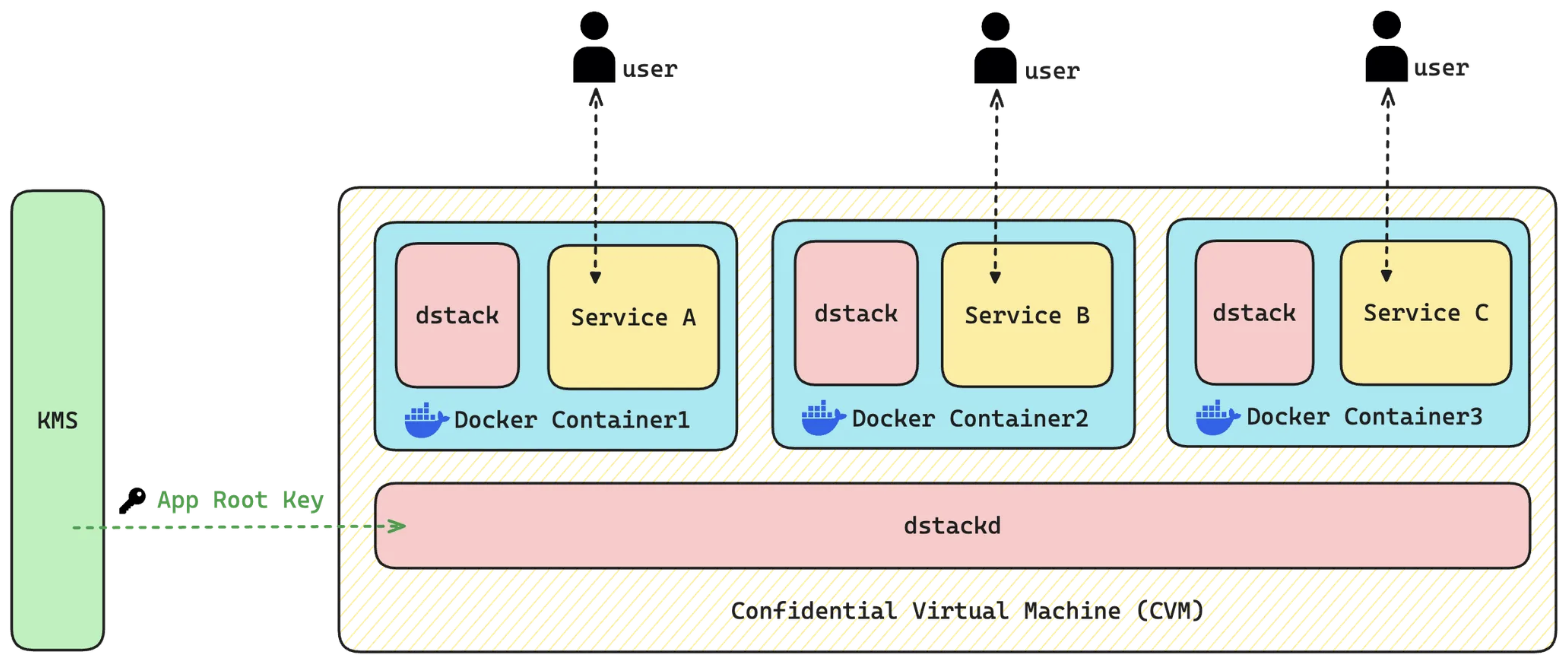
.png?fit=max&auto=format&n=57prl00-u-jQKn3n&q=85&s=83135271ccb857f0fe97dc3b11789f94) As the architecture shown below, multiple docker containers can run inside one single CVM. The underlying infrastructure we provide is to make sure the application is secure and verifiable.
The container uses dstack API to communicate with the underlying `dstack-guest-agent`. `dstack-guest-agent` is the component that is responsible to setup the CVM environment, do remote attestation, and manage the whole lifecycle of docker containers, running inside CVM.
`dstack-guest-agent` communicates with a decentralized Key Management Service (KMS), that derives deterministic encryption keys for the application. The keys will be utilized to encrypt storage specific to the application and to protect the its data integrity. With KMS operating independently from any specific TEE instance, your applications avoid vendor lock-in and can be securely migrated between different hardware environments without any data loss.
As the architecture shown below, multiple docker containers can run inside one single CVM. The underlying infrastructure we provide is to make sure the application is secure and verifiable.
The container uses dstack API to communicate with the underlying `dstack-guest-agent`. `dstack-guest-agent` is the component that is responsible to setup the CVM environment, do remote attestation, and manage the whole lifecycle of docker containers, running inside CVM.
`dstack-guest-agent` communicates with a decentralized Key Management Service (KMS), that derives deterministic encryption keys for the application. The keys will be utilized to encrypt storage specific to the application and to protect the its data integrity. With KMS operating independently from any specific TEE instance, your applications avoid vendor lock-in and can be securely migrated between different hardware environments without any data loss.
 ## Verify If An Application is Running Inside a TEE
When the application launched successfully, the RA Report can be exported with specific interfaces provide `dstack`. The RA Report is bound with the application runtime information, such as the docker image hash, the initial arguments passed to the container, and the environment variables. In addition to signature signed by the key hardcoded in the TEE hardware, the RA report will also be signed with a specific key that bond to the application. Anyone can verify the report with tools supports TEE RA report verification. For applications deployed on Phala Intel TDX workers, their RA report will default be exported and verified, a [TEE Attestation Explorer](https://proof.t16z.com/) is provided for people to check.
## Conclusion
Now that there is an introduction to the dstack, we can begin the fun part of building on the SDK. There are a few ways to get started depending on your starting point. Let's take a look at the options in [Getting Started](/phala-cloud/getting-started/overview).
Or if you are interested in building on Phala Cloud without runing dstack at your own hardware, you can check out the [Phala Cloud](/) page.
## Verify If An Application is Running Inside a TEE
When the application launched successfully, the RA Report can be exported with specific interfaces provide `dstack`. The RA Report is bound with the application runtime information, such as the docker image hash, the initial arguments passed to the container, and the environment variables. In addition to signature signed by the key hardcoded in the TEE hardware, the RA report will also be signed with a specific key that bond to the application. Anyone can verify the report with tools supports TEE RA report verification. For applications deployed on Phala Intel TDX workers, their RA report will default be exported and verified, a [TEE Attestation Explorer](https://proof.t16z.com/) is provided for people to check.
## Conclusion
Now that there is an introduction to the dstack, we can begin the fun part of building on the SDK. There are a few ways to get started depending on your starting point. Let's take a look at the options in [Getting Started](/phala-cloud/getting-started/overview).
Or if you are interested in building on Phala Cloud without runing dstack at your own hardware, you can check out the [Phala Cloud](/) page.