> ## Documentation Index
> Fetch the complete documentation index at: https://docs.phala.com/llms.txt
> Use this file to discover all available pages before exploring further.
> Configure private container registry access for CVM deployments on Phala Cloud.
# Private Container Registry
## Prerequisites
* [Phala Cloud account](/phala-cloud/getting-started/sign-up-for-cloud-account)
* Credentials for one of the supported registries:
* Docker Hub
* GitHub Container Registry (GHCR)
* AWS ECR
## Overview
Phala Cloud supports private image pulls during CVM startup. Registry credentials are passed as encrypted environment variables and only used at runtime inside the trusted boot flow.
## Method 1: Configure from the Dashboard
1. Open CVM creation and go to **Advanced Features**.
2. Open **Private Container Registry**.
3. Select one provider:
* **No private registry**
* **Docker Hub**
* **GHCR**
* **AWS ECR**
4. Fill in credentials for the selected provider.
5. Submit deployment.
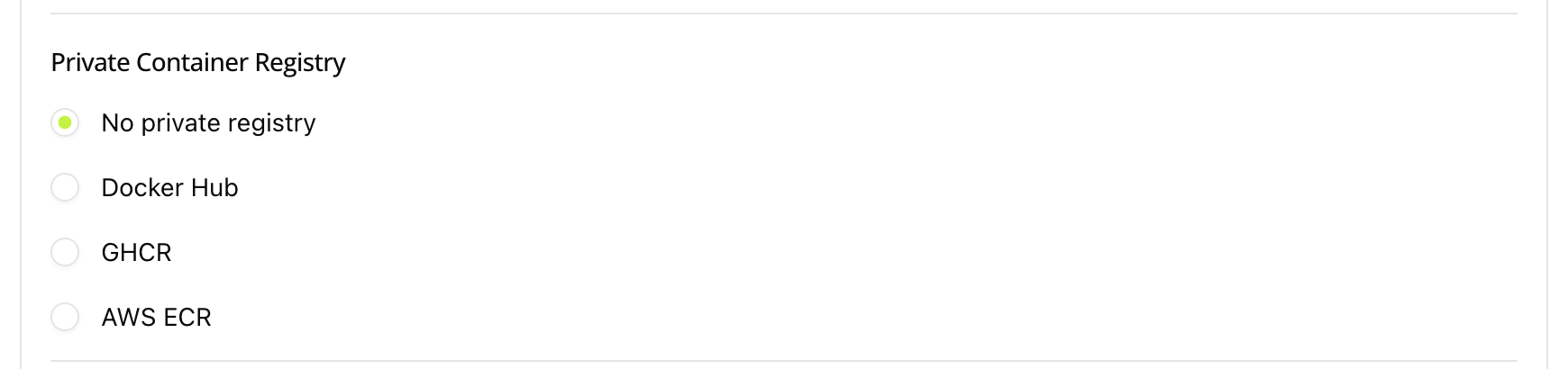 All registry credentials are encrypted before submission and consumed only at runtime.
## Method 2: Configure with Encrypted Secrets
Set the following environment variables for CLI or API workflows.
### Docker Hub
Use your Docker Hub username and password (or [access token](https://docs.docker.com/security/for-developers/access-tokens/)). Image paths follow the format `username/image:tag` or `docker.io/username/image:tag`.
See [Docker Hub documentation](https://docs.docker.com/docker-hub/) for account and repository setup.
| Variable | Required | Description |
| ------------------------ | -------- | ----------------------------------- |
| `DSTACK_DOCKER_USERNAME` | Yes | Docker Hub username |
| `DSTACK_DOCKER_PASSWORD` | Yes | Docker Hub password or access token |
Docker Hub is the default registry — you do **not** need to set `DSTACK_DOCKER_REGISTRY`.
### GHCR
All registry credentials are encrypted before submission and consumed only at runtime.
## Method 2: Configure with Encrypted Secrets
Set the following environment variables for CLI or API workflows.
### Docker Hub
Use your Docker Hub username and password (or [access token](https://docs.docker.com/security/for-developers/access-tokens/)). Image paths follow the format `username/image:tag` or `docker.io/username/image:tag`.
See [Docker Hub documentation](https://docs.docker.com/docker-hub/) for account and repository setup.
| Variable | Required | Description |
| ------------------------ | -------- | ----------------------------------- |
| `DSTACK_DOCKER_USERNAME` | Yes | Docker Hub username |
| `DSTACK_DOCKER_PASSWORD` | Yes | Docker Hub password or access token |
Docker Hub is the default registry — you do **not** need to set `DSTACK_DOCKER_REGISTRY`.
### GHCR
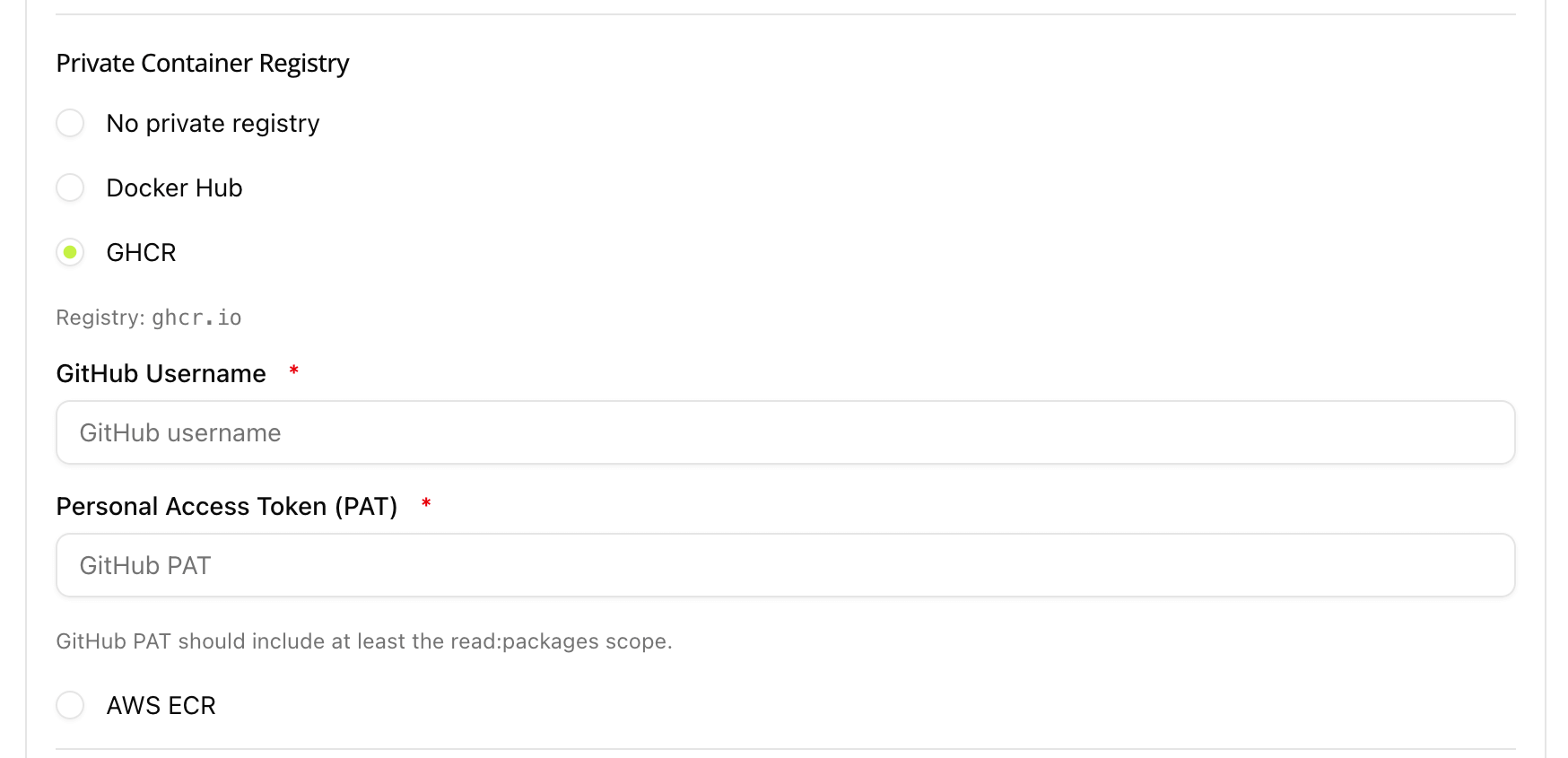 Use your GitHub username and a PAT with `read:packages` scope. Image paths follow the format `ghcr.io/OWNER/IMAGE:TAG`.
With [GitHub CLI](https://cli.github.com/), check your token scopes, add `read:packages` if missing, and print the token:
```bash theme={"system"}
gh auth status # check current scopes
gh auth refresh -s read:packages # add read:packages if missing
gh auth token # print token for DSTACK_DOCKER_PASSWORD
```
You can also create a PAT manually at [GitHub Settings → Personal access tokens](https://github.com/settings/tokens).
See [GHCR documentation](https://docs.github.com/en/packages/working-with-a-github-packages-registry/working-with-the-container-registry) for package visibility and permission details.
| Variable | Required | Description |
| ------------------------ | -------- | --------------------------------------------------------- |
| `DSTACK_DOCKER_USERNAME` | Yes | GitHub username |
| `DSTACK_DOCKER_PASSWORD` | Yes | GitHub PAT |
| `DSTACK_DOCKER_REGISTRY` | Yes | Must be `ghcr.io` |
### AWS ECR
Use your GitHub username and a PAT with `read:packages` scope. Image paths follow the format `ghcr.io/OWNER/IMAGE:TAG`.
With [GitHub CLI](https://cli.github.com/), check your token scopes, add `read:packages` if missing, and print the token:
```bash theme={"system"}
gh auth status # check current scopes
gh auth refresh -s read:packages # add read:packages if missing
gh auth token # print token for DSTACK_DOCKER_PASSWORD
```
You can also create a PAT manually at [GitHub Settings → Personal access tokens](https://github.com/settings/tokens).
See [GHCR documentation](https://docs.github.com/en/packages/working-with-a-github-packages-registry/working-with-the-container-registry) for package visibility and permission details.
| Variable | Required | Description |
| ------------------------ | -------- | --------------------------------------------------------- |
| `DSTACK_DOCKER_USERNAME` | Yes | GitHub username |
| `DSTACK_DOCKER_PASSWORD` | Yes | GitHub PAT |
| `DSTACK_DOCKER_REGISTRY` | Yes | Must be `ghcr.io` |
### AWS ECR
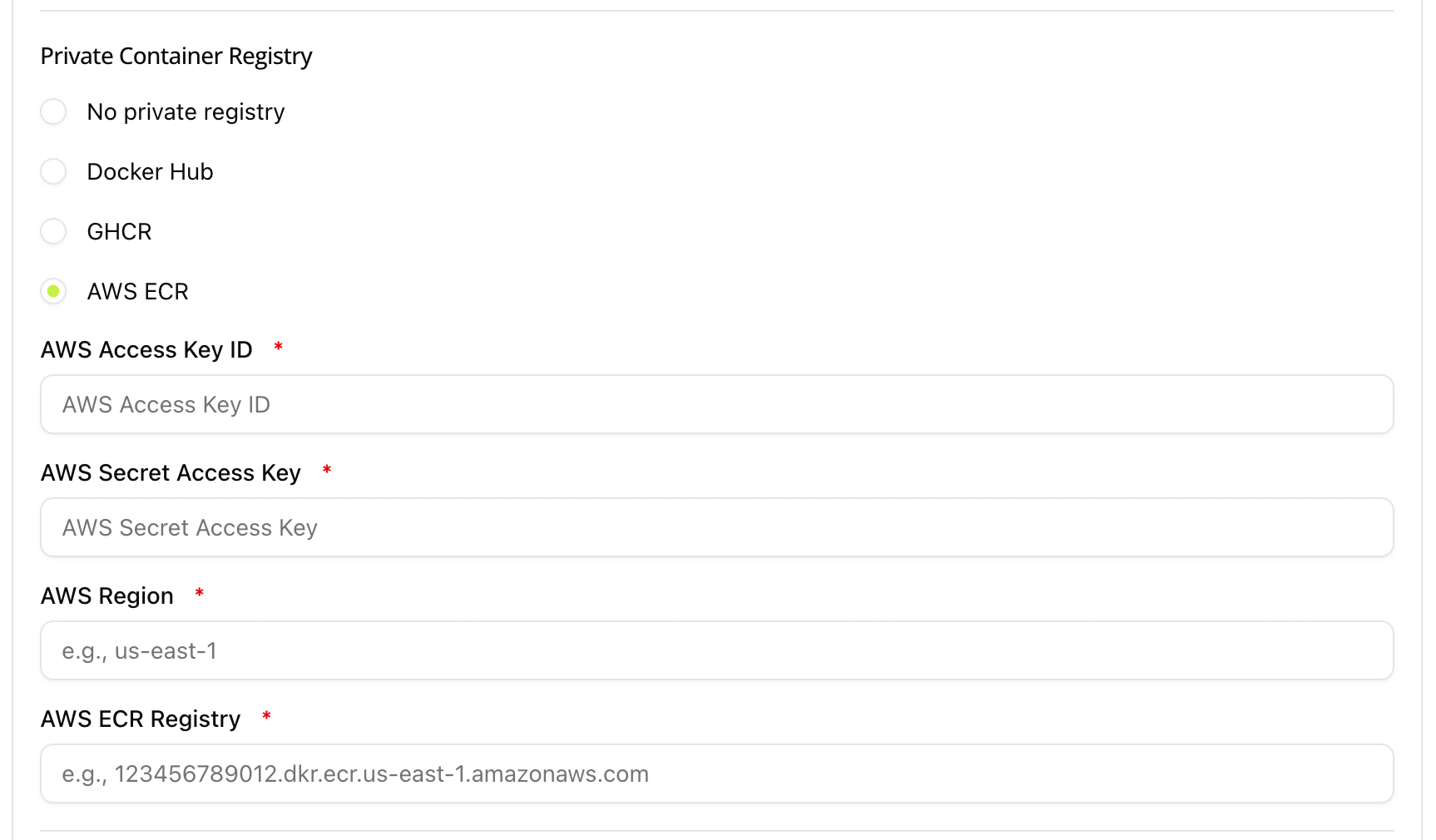 Use an IAM access key with `ecr:GetAuthorizationToken` and `ecr:BatchGetImage` permissions. Image paths follow the format `ACCOUNT_ID.dkr.ecr.REGION.amazonaws.com/REPO:TAG`.
With [AWS CLI](https://aws.amazon.com/cli/):
```bash theme={"system"}
aws sts get-caller-identity # verify current identity
aws ecr describe-repositories --region # list repos to confirm access
aws iam create-access-key --user-name # create a new access key
```
Verify registry login:
```bash theme={"system"}
aws ecr get-login-password --region | docker login --username AWS --password-stdin .dkr.ecr..amazonaws.com
```
See [Amazon ECR documentation](https://docs.aws.amazon.com/AmazonECR/latest/userguide/what-is-ecr.html) for repository creation and IAM policy setup.
| Variable | Required | Description |
| ------------------------------ | -------- | --------------------- |
| `DSTACK_AWS_ACCESS_KEY_ID` | Yes | AWS access key ID |
| `DSTACK_AWS_SECRET_ACCESS_KEY` | Yes | AWS secret access key |
| `DSTACK_AWS_REGION` | Yes | ECR region |
| `DSTACK_AWS_ECR_REGISTRY` | Yes | Full ECR registry URL |
## Deploy with Phala Cloud CLI
You can deploy with [`phala` CLI](/phala-cloud/phala-cloud-cli/overview) and pass secrets via `-e .env`.
### GHCR example
`.env`:
```bash theme={"system"}
DSTACK_DOCKER_USERNAME=your_github_username
DSTACK_DOCKER_PASSWORD=your_github_pat
DSTACK_DOCKER_REGISTRY=ghcr.io
```
`docker-compose.yml`:
```yaml theme={"system"}
version: '3.8'
services:
app:
image: ghcr.io/your-org/your-image:v1.0.0
ports:
- "3000:3000"
environment:
- DSTACK_DOCKER_USERNAME=${DSTACK_DOCKER_USERNAME}
- DSTACK_DOCKER_PASSWORD=${DSTACK_DOCKER_PASSWORD}
- DSTACK_DOCKER_REGISTRY=${DSTACK_DOCKER_REGISTRY}
```
Deploy:
```bash theme={"system"}
phala deploy -n my-private-app -c docker-compose.yml -e .env
```
### AWS ECR example
`.env`:
```bash theme={"system"}
DSTACK_AWS_ACCESS_KEY_ID=AKIA...
DSTACK_AWS_SECRET_ACCESS_KEY=...
DSTACK_AWS_REGION=us-east-1
DSTACK_AWS_ECR_REGISTRY=123456789012.dkr.ecr.us-east-1.amazonaws.com
```
## Deploy with Phala Cloud API
When using the API, set the same environment variables listed above.
See [Phala Cloud API docs](/phala-cloud/phala-cloud-api/overview) for endpoint details.
## Pull Rate Limits
Each registry enforces pull rate limits. During frequent debugging and redeployment cycles, these limits can block image pulls and cause CVM startup failures.
### Docker Hub
| Account type | Limit |
| ------------------------------------- | -------------------------- |
| Unauthenticated | 100 pulls / 6 hours per IP |
| Docker Personal (free, authenticated) | 200 pulls / 6 hours |
| Docker Pro / Team / Business | Unlimited |
CVM instances pull images on every startup. If you are iterating quickly on a public Docker Hub image **without** setting `DSTACK_DOCKER_USERNAME` / `DSTACK_DOCKER_PASSWORD`, pulls are unauthenticated and share the 100-pull limit across the host IP. Always configure Docker Hub credentials during active development to get the higher authenticated limit.
See [Docker Hub pull usage and limits](https://docs.docker.com/docker-hub/usage/pulls/) for details.
### GHCR
GitHub does not publish hard pull rate limits for GHCR. Public image pulls are effectively unlimited. Private image pulls are subject to your GitHub plan's data transfer quota. See [GitHub billing for Packages](https://docs.github.com/en/billing/managing-billing-for-github-packages/about-billing-for-github-packages) for details.
### AWS ECR
Private ECR does not impose per-image pull rate limits. API calls (e.g. `GetAuthorizationToken`) are throttled at \~20 TPS per region per account. See [Amazon ECR service quotas](https://docs.aws.amazon.com/AmazonECR/latest/userguide/service-quotas.html) for details.
## Troubleshooting
If private image deployment fails:
1. Verify credentials are valid and not expired.
2. Ensure image path and tag exist.
3. Confirm pull permissions for the account used.
4. Check CVM serial logs for pre-launch errors.
### GHCR-specific checks
* `DSTACK_DOCKER_REGISTRY` is set to `ghcr.io`
* PAT contains at least `read:packages`
* The package visibility and permission settings allow this account to pull
For additional assistance, join support groups: 🌍 [Global](https://t.me/+nbhjx1ADG9EyYmI9), 🇨🇳 [Chinese](https://t.me/+4PcAE9qTZ1kzM2M9).
Use an IAM access key with `ecr:GetAuthorizationToken` and `ecr:BatchGetImage` permissions. Image paths follow the format `ACCOUNT_ID.dkr.ecr.REGION.amazonaws.com/REPO:TAG`.
With [AWS CLI](https://aws.amazon.com/cli/):
```bash theme={"system"}
aws sts get-caller-identity # verify current identity
aws ecr describe-repositories --region # list repos to confirm access
aws iam create-access-key --user-name # create a new access key
```
Verify registry login:
```bash theme={"system"}
aws ecr get-login-password --region | docker login --username AWS --password-stdin .dkr.ecr..amazonaws.com
```
See [Amazon ECR documentation](https://docs.aws.amazon.com/AmazonECR/latest/userguide/what-is-ecr.html) for repository creation and IAM policy setup.
| Variable | Required | Description |
| ------------------------------ | -------- | --------------------- |
| `DSTACK_AWS_ACCESS_KEY_ID` | Yes | AWS access key ID |
| `DSTACK_AWS_SECRET_ACCESS_KEY` | Yes | AWS secret access key |
| `DSTACK_AWS_REGION` | Yes | ECR region |
| `DSTACK_AWS_ECR_REGISTRY` | Yes | Full ECR registry URL |
## Deploy with Phala Cloud CLI
You can deploy with [`phala` CLI](/phala-cloud/phala-cloud-cli/overview) and pass secrets via `-e .env`.
### GHCR example
`.env`:
```bash theme={"system"}
DSTACK_DOCKER_USERNAME=your_github_username
DSTACK_DOCKER_PASSWORD=your_github_pat
DSTACK_DOCKER_REGISTRY=ghcr.io
```
`docker-compose.yml`:
```yaml theme={"system"}
version: '3.8'
services:
app:
image: ghcr.io/your-org/your-image:v1.0.0
ports:
- "3000:3000"
environment:
- DSTACK_DOCKER_USERNAME=${DSTACK_DOCKER_USERNAME}
- DSTACK_DOCKER_PASSWORD=${DSTACK_DOCKER_PASSWORD}
- DSTACK_DOCKER_REGISTRY=${DSTACK_DOCKER_REGISTRY}
```
Deploy:
```bash theme={"system"}
phala deploy -n my-private-app -c docker-compose.yml -e .env
```
### AWS ECR example
`.env`:
```bash theme={"system"}
DSTACK_AWS_ACCESS_KEY_ID=AKIA...
DSTACK_AWS_SECRET_ACCESS_KEY=...
DSTACK_AWS_REGION=us-east-1
DSTACK_AWS_ECR_REGISTRY=123456789012.dkr.ecr.us-east-1.amazonaws.com
```
## Deploy with Phala Cloud API
When using the API, set the same environment variables listed above.
See [Phala Cloud API docs](/phala-cloud/phala-cloud-api/overview) for endpoint details.
## Pull Rate Limits
Each registry enforces pull rate limits. During frequent debugging and redeployment cycles, these limits can block image pulls and cause CVM startup failures.
### Docker Hub
| Account type | Limit |
| ------------------------------------- | -------------------------- |
| Unauthenticated | 100 pulls / 6 hours per IP |
| Docker Personal (free, authenticated) | 200 pulls / 6 hours |
| Docker Pro / Team / Business | Unlimited |
CVM instances pull images on every startup. If you are iterating quickly on a public Docker Hub image **without** setting `DSTACK_DOCKER_USERNAME` / `DSTACK_DOCKER_PASSWORD`, pulls are unauthenticated and share the 100-pull limit across the host IP. Always configure Docker Hub credentials during active development to get the higher authenticated limit.
See [Docker Hub pull usage and limits](https://docs.docker.com/docker-hub/usage/pulls/) for details.
### GHCR
GitHub does not publish hard pull rate limits for GHCR. Public image pulls are effectively unlimited. Private image pulls are subject to your GitHub plan's data transfer quota. See [GitHub billing for Packages](https://docs.github.com/en/billing/managing-billing-for-github-packages/about-billing-for-github-packages) for details.
### AWS ECR
Private ECR does not impose per-image pull rate limits. API calls (e.g. `GetAuthorizationToken`) are throttled at \~20 TPS per region per account. See [Amazon ECR service quotas](https://docs.aws.amazon.com/AmazonECR/latest/userguide/service-quotas.html) for details.
## Troubleshooting
If private image deployment fails:
1. Verify credentials are valid and not expired.
2. Ensure image path and tag exist.
3. Confirm pull permissions for the account used.
4. Check CVM serial logs for pre-launch errors.
### GHCR-specific checks
* `DSTACK_DOCKER_REGISTRY` is set to `ghcr.io`
* PAT contains at least `read:packages`
* The package visibility and permission settings allow this account to pull
For additional assistance, join support groups: 🌍 [Global](https://t.me/+nbhjx1ADG9EyYmI9), 🇨🇳 [Chinese](https://t.me/+4PcAE9qTZ1kzM2M9).