> ## Documentation Index
> Fetch the complete documentation index at: https://docs.phala.com/llms.txt
> Use this file to discover all available pages before exploring further.
> Make your first OpenAI-compatible Confidential AI request through Phala, then confirm it was served through an attested gateway.
# On-demand API
## Overview
On-demand Confidential AI API provides an OpenAI-compatible interface for confidential inference. Requests go through Phala's ACI gateway at `https://inference.phala.com/v1`. The gateway runs in a TEE, publishes an attestation report, and signs a per-response receipt that you can verify.
For dedicated GPU resources with hourly pricing, see [Dedicated Models](/phala-cloud/confidential-ai/confidential-gpu/model-template). Both options use the same API surface; billing and resource allocation are the main differences.
## Prerequisites
Before you begin, ensure you have enough funds to get the API key. You need at least \$5 in your account. Go to **Dashboard** and click **Deposit** to add funds.
Navigate to **Dashboard** → **Confidential AI API** and click **Enable**. Then create your first API key and click the key to copy.
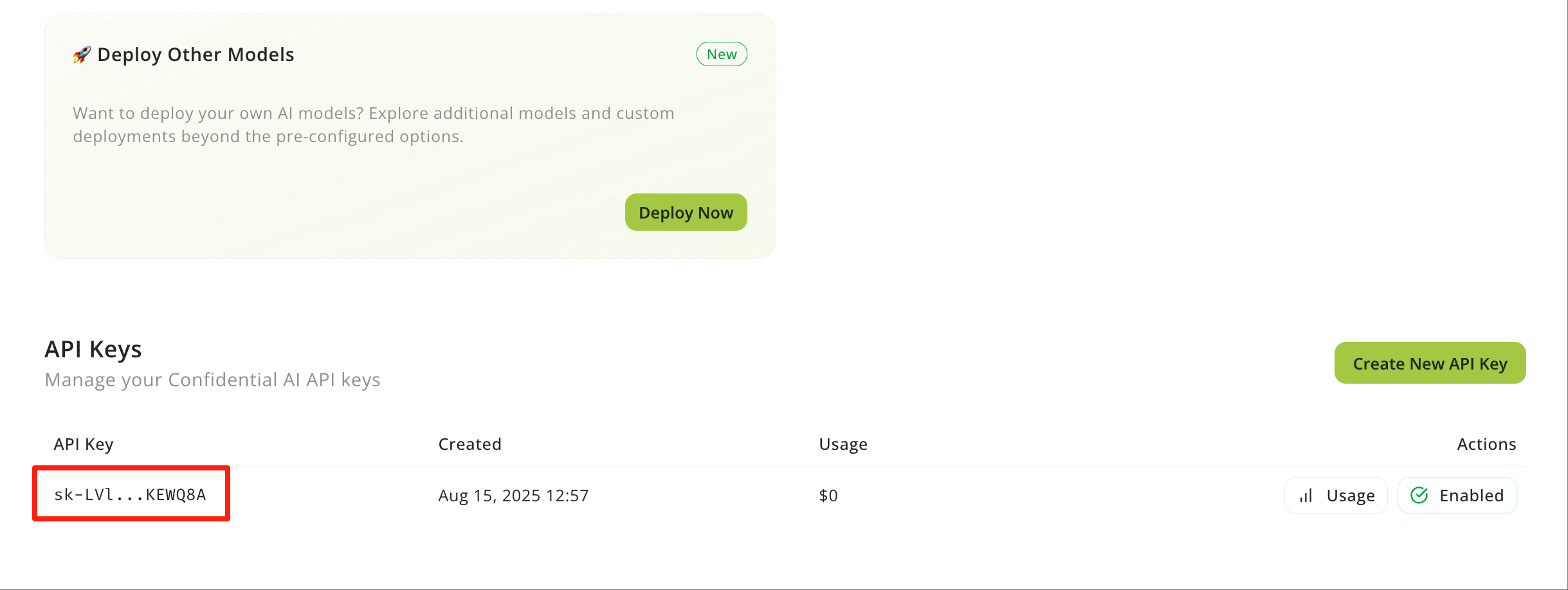 Once you get the API Key, you can start making requests to the Confidential AI API.
## Make Your First Request
Replace `` with your actual API key. The examples below use `phala/qwen3.5-27b`; use [List Models](/phala-cloud/confidential-ai/confidential-model/api-reference/models) to choose a model for your workload.
```python Python theme={"system"}
# Install OpenAI SDK: `pip3 install openai`
from openai import OpenAI
client = OpenAI(
api_key="",
base_url="https://inference.phala.com/v1",
)
response = client.chat.completions.create(
model="phala/qwen3.5-27b",
messages=[
{"role": "system", "content": "You are a helpful assistant"},
{"role": "user", "content": "What is your model name?"},
],
)
print(response.choices[0].message.content)
```
```typescript TypeScript theme={"system"}
import OpenAI from 'openai';
const client = new OpenAI({
baseURL: 'https://inference.phala.com/v1',
apiKey: '',
});
async function main() {
const completion = await client.chat.completions.create({
model: 'phala/qwen3.5-27b',
messages: [
{
role: 'user',
content: 'What is the meaning of life?',
},
],
});
console.log(completion.choices[0].message);
}
main();
```
```bash CLI theme={"system"}
curl -X 'POST' \
'https://inference.phala.com/v1/chat/completions' \
-H 'accept: application/json' \
-H 'Content-Type: application/json' \
-H 'Authorization: Bearer ' \
-d '{
"messages": [
{
"content": "You are a helpful assistant.",
"role": "system"
},
{
"content": "What is your model name?",
"role": "user"
}
],
"model": "phala/qwen3.5-27b"
}'
```
The response is a standard OpenAI chat completion. In raw HTTP responses, Phala also returns verification headers:
| Header | Meaning |
| --------------------- | ---------------------------------------------------------------------- |
| `x-receipt-id` | Receipt id for this response. Use it with `GET /v1/aci/receipts/{id}`. |
| `x-aci-identity` | Attested gateway workload identity. |
| `x-aci-keyset-digest` | Digest of the gateway keyset used for receipt verification. |
## Confirm the Response Was Attested
Fetch the receipt with the `x-receipt-id` header:
```bash theme={"system"}
curl -s "https://inference.phala.com/v1/aci/receipts/$RECEIPT_ID" \
-H "Authorization: Bearer " | \
jq '.event_log[] | select(.type=="upstream.verified") | {provider, result, required, session_id}'
```
For a confidential response, `result` is `verified` and `required` is `true`. To verify the gateway identity and receipt signature end to end, follow [Verify a Response](/phala-cloud/confidential-ai/verify/verify-signature).
## Available Models
The live catalog is authoritative; query it before hardcoding model IDs:
```bash theme={"system"}
curl https://inference.phala.com/v1/models \
-H "Authorization: Bearer "
```
Pricing and availability can change; use the API response for production routing.
### Phala Models
| Model ID | Context | Modality | Pricing (input/output per 1M tokens) |
| ---------------------------------------- | ------- | ------------- | ------------------------------------ |
| `phala/qwen3.5-27b` | 262K | Text | $0.30 / $2.40 |
| `phala/qwen3-vl-30b-a3b-instruct` | 128K | Vision + Text | $0.20 / $0.70 |
| `qwen/qwen3-embedding-8b` | 32K | Embeddings | $0.01 / $0 |
| `phala/gemma-3-27b-it` | 53K | Vision + Text | $0.11 / $0.40 |
| `phala/glm-4.7-flash` | 202K | Text | $0.10 / $0.43 |
| `phala/gpt-oss-20b` | 131K | Text | $0.04 / $0.15 |
| `phala/qwen-2.5-7b-instruct` | 32K | Text | $0.04 / $0.10 |
| `phala/qwen2.5-vl-72b-instruct` | 128K | Vision + Text | $0.40 / $1.20 |
| `phala/uncensored-24b` | 32K | Text | $0.20 / $0.90 |
| `sentence-transformers/all-minilm-l6-v2` | 512 | Embeddings | $0.005 / $0 |
`phala/qwen2.5-vl-72b-instruct` is a legacy alias that may route to `phala/qwen3-vl-30b-a3b-instruct`. Prefer the canonical ID returned by `/v1/models`.
TEE provider presence and confidential serving are not identical for every provider and model. Use `is_tee` from `/v1/models` to find models that can be served confidentially, then verify the actual response with its `x-receipt-id`.
## Verify Your AI is Running Securely
Before trusting receipts, fetch a fresh [Attestation Report](/phala-cloud/confidential-ai/confidential-model/api-reference/attestation). Then fetch the [Receipt](/phala-cloud/confidential-ai/confidential-model/api-reference/receipts) for a response and verify that its `workload_id` and `workload_keyset_digest` match the report.
The legacy [Signature](/phala-cloud/confidential-ai/confidential-model/api-reference/signature) endpoint remains available for older clients, but new integrations should use `GET /v1/aci/receipts/{id}`.
## Next Steps
Use the API reference and feature guides for the next step:
* [Chat Completions](/phala-cloud/confidential-ai/confidential-model/api-reference/chat-completions) documents the core request and response shape.
* [List Models](/phala-cloud/confidential-ai/confidential-model/api-reference/models) shows how to discover models programmatically.
* [Get Receipt](/phala-cloud/confidential-ai/confidential-model/api-reference/receipts) documents the canonical per-response proof.
* [Embeddings](/phala-cloud/confidential-ai/confidential-model/api-reference/embeddings) covers embedding model calls.
* [Tool Calling](/phala-cloud/confidential-ai/confidential-model/tool-calling) helps you call tools from your AI models.
* [Images and Vision](/phala-cloud/confidential-ai/confidential-model/images-and-vision) helps you use image-capable models.
* [Structured Output](/phala-cloud/confidential-ai/confidential-model/structured-output) helps you get JSON responses.
* [Streaming](/phala-cloud/confidential-ai/confidential-model/streaming) helps you consume streaming responses.
* [Playground](/phala-cloud/confidential-ai/confidential-model/playground) helps you test models in a private environment.
Once you get the API Key, you can start making requests to the Confidential AI API.
## Make Your First Request
Replace `` with your actual API key. The examples below use `phala/qwen3.5-27b`; use [List Models](/phala-cloud/confidential-ai/confidential-model/api-reference/models) to choose a model for your workload.
```python Python theme={"system"}
# Install OpenAI SDK: `pip3 install openai`
from openai import OpenAI
client = OpenAI(
api_key="",
base_url="https://inference.phala.com/v1",
)
response = client.chat.completions.create(
model="phala/qwen3.5-27b",
messages=[
{"role": "system", "content": "You are a helpful assistant"},
{"role": "user", "content": "What is your model name?"},
],
)
print(response.choices[0].message.content)
```
```typescript TypeScript theme={"system"}
import OpenAI from 'openai';
const client = new OpenAI({
baseURL: 'https://inference.phala.com/v1',
apiKey: '',
});
async function main() {
const completion = await client.chat.completions.create({
model: 'phala/qwen3.5-27b',
messages: [
{
role: 'user',
content: 'What is the meaning of life?',
},
],
});
console.log(completion.choices[0].message);
}
main();
```
```bash CLI theme={"system"}
curl -X 'POST' \
'https://inference.phala.com/v1/chat/completions' \
-H 'accept: application/json' \
-H 'Content-Type: application/json' \
-H 'Authorization: Bearer ' \
-d '{
"messages": [
{
"content": "You are a helpful assistant.",
"role": "system"
},
{
"content": "What is your model name?",
"role": "user"
}
],
"model": "phala/qwen3.5-27b"
}'
```
The response is a standard OpenAI chat completion. In raw HTTP responses, Phala also returns verification headers:
| Header | Meaning |
| --------------------- | ---------------------------------------------------------------------- |
| `x-receipt-id` | Receipt id for this response. Use it with `GET /v1/aci/receipts/{id}`. |
| `x-aci-identity` | Attested gateway workload identity. |
| `x-aci-keyset-digest` | Digest of the gateway keyset used for receipt verification. |
## Confirm the Response Was Attested
Fetch the receipt with the `x-receipt-id` header:
```bash theme={"system"}
curl -s "https://inference.phala.com/v1/aci/receipts/$RECEIPT_ID" \
-H "Authorization: Bearer " | \
jq '.event_log[] | select(.type=="upstream.verified") | {provider, result, required, session_id}'
```
For a confidential response, `result` is `verified` and `required` is `true`. To verify the gateway identity and receipt signature end to end, follow [Verify a Response](/phala-cloud/confidential-ai/verify/verify-signature).
## Available Models
The live catalog is authoritative; query it before hardcoding model IDs:
```bash theme={"system"}
curl https://inference.phala.com/v1/models \
-H "Authorization: Bearer "
```
Pricing and availability can change; use the API response for production routing.
### Phala Models
| Model ID | Context | Modality | Pricing (input/output per 1M tokens) |
| ---------------------------------------- | ------- | ------------- | ------------------------------------ |
| `phala/qwen3.5-27b` | 262K | Text | $0.30 / $2.40 |
| `phala/qwen3-vl-30b-a3b-instruct` | 128K | Vision + Text | $0.20 / $0.70 |
| `qwen/qwen3-embedding-8b` | 32K | Embeddings | $0.01 / $0 |
| `phala/gemma-3-27b-it` | 53K | Vision + Text | $0.11 / $0.40 |
| `phala/glm-4.7-flash` | 202K | Text | $0.10 / $0.43 |
| `phala/gpt-oss-20b` | 131K | Text | $0.04 / $0.15 |
| `phala/qwen-2.5-7b-instruct` | 32K | Text | $0.04 / $0.10 |
| `phala/qwen2.5-vl-72b-instruct` | 128K | Vision + Text | $0.40 / $1.20 |
| `phala/uncensored-24b` | 32K | Text | $0.20 / $0.90 |
| `sentence-transformers/all-minilm-l6-v2` | 512 | Embeddings | $0.005 / $0 |
`phala/qwen2.5-vl-72b-instruct` is a legacy alias that may route to `phala/qwen3-vl-30b-a3b-instruct`. Prefer the canonical ID returned by `/v1/models`.
TEE provider presence and confidential serving are not identical for every provider and model. Use `is_tee` from `/v1/models` to find models that can be served confidentially, then verify the actual response with its `x-receipt-id`.
## Verify Your AI is Running Securely
Before trusting receipts, fetch a fresh [Attestation Report](/phala-cloud/confidential-ai/confidential-model/api-reference/attestation). Then fetch the [Receipt](/phala-cloud/confidential-ai/confidential-model/api-reference/receipts) for a response and verify that its `workload_id` and `workload_keyset_digest` match the report.
The legacy [Signature](/phala-cloud/confidential-ai/confidential-model/api-reference/signature) endpoint remains available for older clients, but new integrations should use `GET /v1/aci/receipts/{id}`.
## Next Steps
Use the API reference and feature guides for the next step:
* [Chat Completions](/phala-cloud/confidential-ai/confidential-model/api-reference/chat-completions) documents the core request and response shape.
* [List Models](/phala-cloud/confidential-ai/confidential-model/api-reference/models) shows how to discover models programmatically.
* [Get Receipt](/phala-cloud/confidential-ai/confidential-model/api-reference/receipts) documents the canonical per-response proof.
* [Embeddings](/phala-cloud/confidential-ai/confidential-model/api-reference/embeddings) covers embedding model calls.
* [Tool Calling](/phala-cloud/confidential-ai/confidential-model/tool-calling) helps you call tools from your AI models.
* [Images and Vision](/phala-cloud/confidential-ai/confidential-model/images-and-vision) helps you use image-capable models.
* [Structured Output](/phala-cloud/confidential-ai/confidential-model/structured-output) helps you get JSON responses.
* [Streaming](/phala-cloud/confidential-ai/confidential-model/streaming) helps you consume streaming responses.
* [Playground](/phala-cloud/confidential-ai/confidential-model/playground) helps you test models in a private environment.