> ## Documentation Index
> Fetch the complete documentation index at: https://docs.phala.com/llms.txt
> Use this file to discover all available pages before exploring further.
# Code Walkthrough and KT Materials
> Code walkthrough and knowledge transfer materials for the dstack-cloud project.
# Code Walkthrough and KT Materials
This page is an internal knowledge-transfer resource. It maps the codebase structure, traces the key request path from application to KMS, and highlights the files you'll need to understand when contributing to dstack-cloud.
> **Note:** This document is an internal deliverable for new contributors and team members.
## Guide for New Contributors
If you're new to dstack-cloud, here's the recommended reading order:
1. **Understand the architecture** — Read [overview](/dstack-cloud/overview) first to get the big picture
2. **Set up the development environment** — Follow the README in the repository root
3. **Start with a simple workload** — Deploy a basic nginx container on GCP using the Quick Start
4. **Explore the KMS** — Deploy KMS and observe the bootstrap flow
5. **Read the attestation code** — Understand how measurements are generated and verified
6. **Review the contracts** — Understand the governance model and on-chain authorization
## Repository Structure
The codebase is organized into these key areas:
```
dstack-cloud/
├── cli/ # dstack-cloud CLI tool
├── kms/ # dstack-kms service
├── packages/
│ ├── attestation/ # Attestation modules (TDX, NSM, TPM)
│ ├── guest-agent/ # Guest Agent (runs inside CVM)
│ ├── gateway/ # TLS termination and RA-TLS gateway
│ └── vmm/ # Virtual Machine Monitor
├── contracts/ # Smart contracts (DstackKms, DstackApp)
├── scripts/ # Build and deployment scripts
└── docs/ # Documentation
```
## Core Request Paths
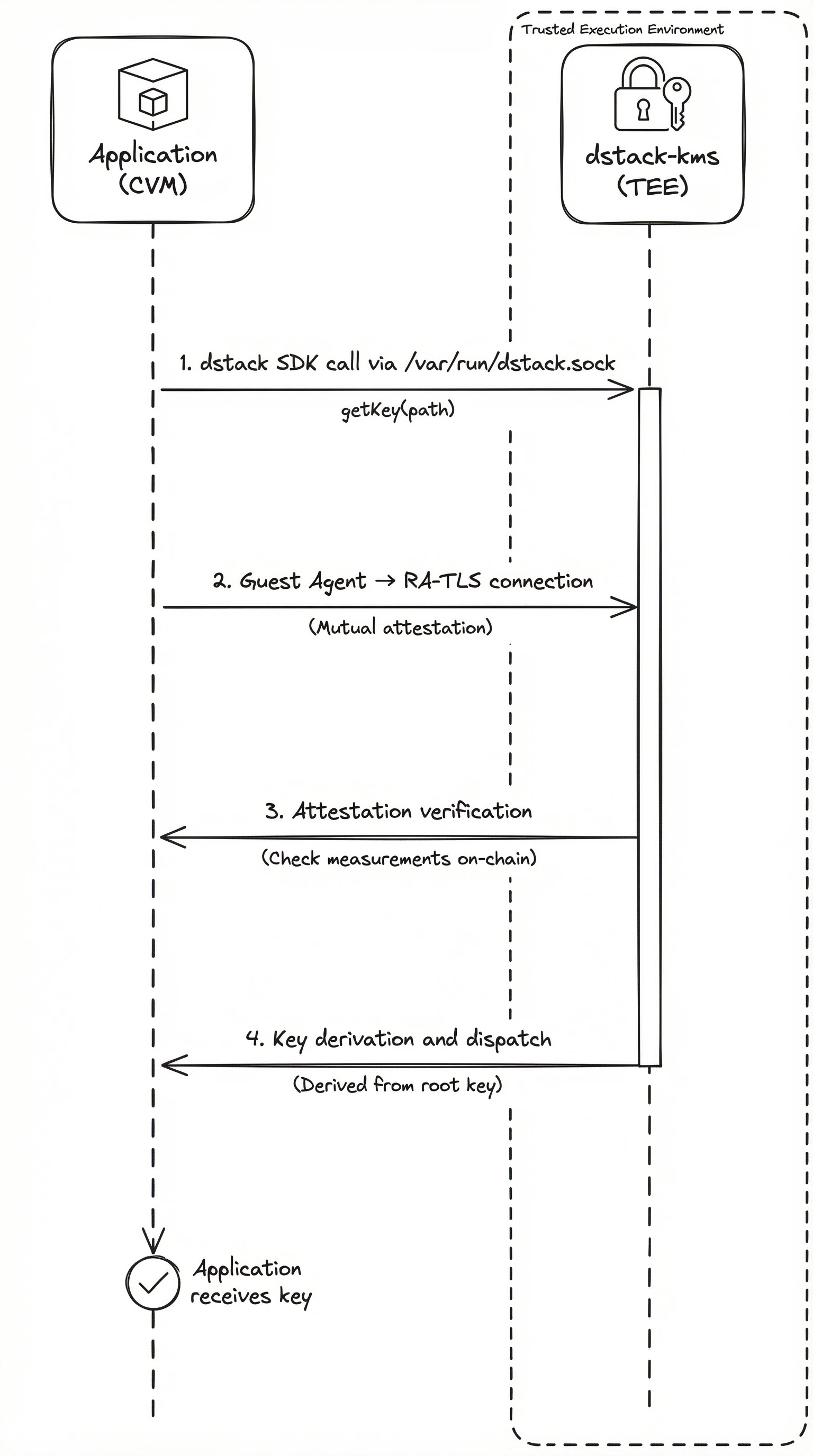
Understanding how a key request flows through the system is the best way to learn the codebase. Here's what happens when an application asks KMS for a key:
### Key Request Flow
**GCP (via Guest Agent):**
```
Application (in CVM)
→ dstack SDK (via /var/run/dstack.sock)
→ Guest Agent
→ RA-TLS connection
→ dstack-kms (in separate TEE)
→ Attestation verification
→ On-chain measurement check
→ Key derivation and dispatch
→ RA-TLS response
→ Guest Agent
→ Application receives key
```
**AWS Nitro (via dstack-util):**
```
dstack-util (in Enclave)
→ NSM attestation document obtained
→ VSOCK → VSOCK Proxy → dstack-kms (in separate TEE)
→ Attestation verification (NSM + OS_IMAGE_HASH)
→ On-chain measurement check
→ Key derivation and dispatch
→ Key returned to dstack-util
→ Application receives key (user decides usage)
```
 ### CVM Deployment Flow
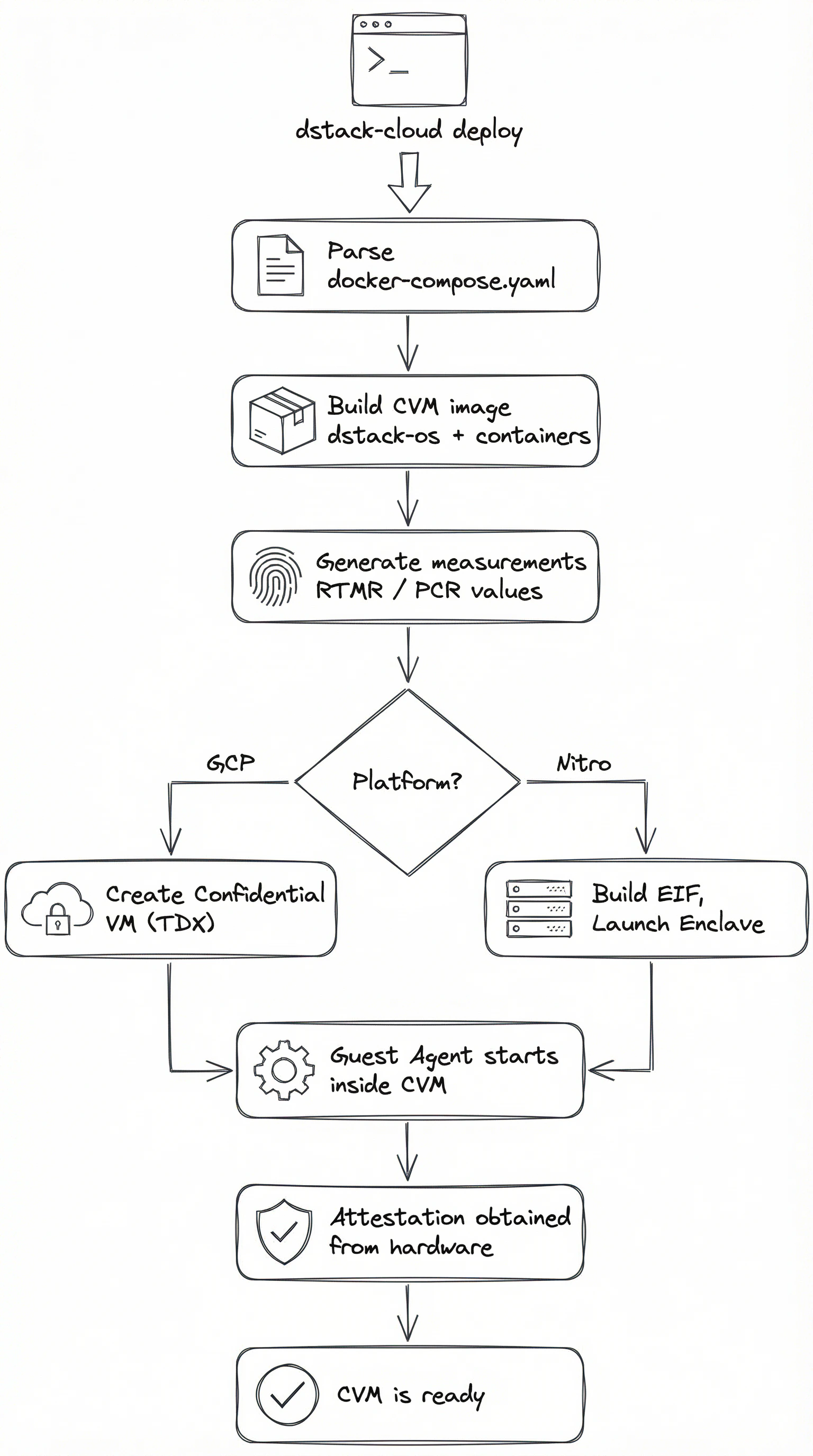
When you run `dstack-cloud deploy`, the CLI parses your configuration and orchestrates the creation of a TEE environment. The flow differs by platform:
**GCP (dstack CVM):**
```
dstack-cloud deploy
→ Parse docker-compose.yaml
→ Build CVM image (dstack-os + containers)
→ Generate measurements (RTMR values)
→ Create Confidential VM with TDX
→ Guest Agent starts inside CVM
→ Attestation obtained from hardware
```
**AWS Nitro (Enclave):**
```
dstack-cloud deploy
→ Build Docker image from Dockerfile
→ Run nitro-cli build-enclave → generates EIF
→ 3 PCRs (PCR0-2) produced at build time
→ Combine 3 PCRs into 1 OS_IMAGE_HASH
→ Register OS_IMAGE_HASH on-chain (via governance)
→ Launch Enclave on EC2 instance
→ dstack-util handles attestation and key retrieval
```
### CVM Deployment Flow
When you run `dstack-cloud deploy`, the CLI parses your configuration and orchestrates the creation of a TEE environment. The flow differs by platform:
**GCP (dstack CVM):**
```
dstack-cloud deploy
→ Parse docker-compose.yaml
→ Build CVM image (dstack-os + containers)
→ Generate measurements (RTMR values)
→ Create Confidential VM with TDX
→ Guest Agent starts inside CVM
→ Attestation obtained from hardware
```
**AWS Nitro (Enclave):**
```
dstack-cloud deploy
→ Build Docker image from Dockerfile
→ Run nitro-cli build-enclave → generates EIF
→ 3 PCRs (PCR0-2) produced at build time
→ Combine 3 PCRs into 1 OS_IMAGE_HASH
→ Register OS_IMAGE_HASH on-chain (via governance)
→ Launch Enclave on EC2 instance
→ dstack-util handles attestation and key retrieval
```
 ## Attestation Module
The attestation module abstracts platform-specific hardware attestation behind a common interface. Each platform has its own module:
| Platform | Module | Input | Output |
| --------- | ------------ | ------------ | -------------------- |
| GCP (TDX) | `tdx-attest` | TDX hardware | TDX Quote |
| AWS Nitro | `nsm-attest` | NSM device | Attestation Document |
| GCP (TPM) | `tpm-attest` | TPM device | TPM Quote |
## Key Files
These are the files you'll spend the most time in when contributing:
| File | Purpose |
| ----------------------------------- | ------------------------------------------------------ |
| `kms/src/main.rs` | KMS service entry point, RPC handlers, bootstrap logic |
| `packages/guest-agent/src/main.rs` | Guest Agent entry point, local API server |
| `packages/attestation/src/lib.rs` | Platform-agnostic attestation interface |
| `cli/src/main.rs` | CLI entry point, deploy/status/logs commands |
| `contracts/contracts/DstackKms.sol` | KMS policy contract |
| `contracts/contracts/DstackApp.sol` | Application contract |
## Resources
* [dstack-cloud GitHub](https://github.com/Phala-Network/dstack-cloud)
* [dstack framework GitHub](https://github.com/Dstack-TEE/dstack)
* [dstack Official Documentation](https://docs.phala.com/dstack/overview)
* [dstack Whitepaper](https://docs.phala.com/dstack/design-documents/whitepaper)
## Attestation Module
The attestation module abstracts platform-specific hardware attestation behind a common interface. Each platform has its own module:
| Platform | Module | Input | Output |
| --------- | ------------ | ------------ | -------------------- |
| GCP (TDX) | `tdx-attest` | TDX hardware | TDX Quote |
| AWS Nitro | `nsm-attest` | NSM device | Attestation Document |
| GCP (TPM) | `tpm-attest` | TPM device | TPM Quote |
## Key Files
These are the files you'll spend the most time in when contributing:
| File | Purpose |
| ----------------------------------- | ------------------------------------------------------ |
| `kms/src/main.rs` | KMS service entry point, RPC handlers, bootstrap logic |
| `packages/guest-agent/src/main.rs` | Guest Agent entry point, local API server |
| `packages/attestation/src/lib.rs` | Platform-agnostic attestation interface |
| `cli/src/main.rs` | CLI entry point, deploy/status/logs commands |
| `contracts/contracts/DstackKms.sol` | KMS policy contract |
| `contracts/contracts/DstackApp.sol` | Application contract |
## Resources
* [dstack-cloud GitHub](https://github.com/Phala-Network/dstack-cloud)
* [dstack framework GitHub](https://github.com/Dstack-TEE/dstack)
* [dstack Official Documentation](https://docs.phala.com/dstack/overview)
* [dstack Whitepaper](https://docs.phala.com/dstack/design-documents/whitepaper)